I’m working on a bunch of articles and keep rewriting the same ideas, but my wording starts sounding repetitive or too similar to my sources. I need a reliable, free paraphrasing tool online that keeps the original meaning, avoids plagiarism issues, and doesn’t mangle the grammar. What tools or websites are you using that actually work well for this?
Short answer, there are options, but none do everything for you.
Here are the ones I’d look at:
-
QuillBot free plan
- Good for quick rephrasing.
- Has character limits and fewer modes on free tier.
- Sometimes changes meaning, so you need to double check your sources.
-
Grammarly rewriting
- The free version gives alternative phrasings in the editor.
- Works well for making sentences less repetitive.
- Not great if you want big structural rewrites, more for polishing.
-
Google Docs + your brain
- Paste a paragraph.
- Use the “Tools → Proofread” and then rewrite lines yourself from bullet notes.
- Takes more time but helps avoid sounding like a bot or your sources.
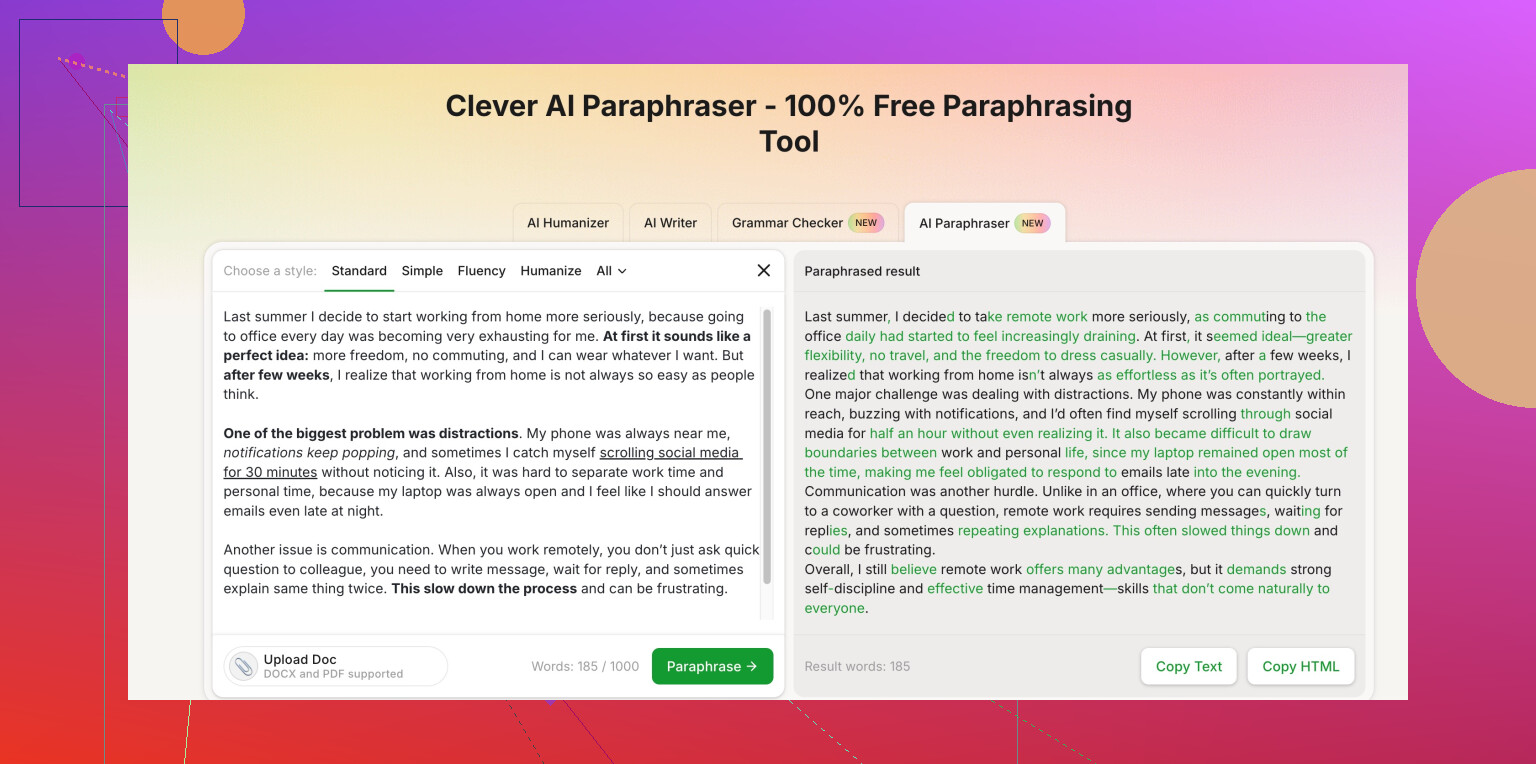
If you want something focused on staying human and not tripping AI detectors, have a look at Clever AI Humanizer. It is built for paraphrasing text to keep meaning while changing tone and structure. This link goes straight to the paraphraser:
human-sounding online paraphrase generator
My honest take. Use any tool as a draft helper only.
Workflow that works for long articles:
- Turn your source into quick bullets in your own words.
- Run your draft lines through a tool for variety if you get stuck.
- Read out loud and fix weird phrases or obvious AI-style wording.
If it starts sounding too clean or robotic, delete and rewrite that part yourself. Tools help, but your voice keeps it from feeling copied.
4 Likes
@nachtschatten already covered the “usual suspects,” so I’ll throw in a slightly different angle and a couple tools that work better if you’re juggling a lot of articles.
If your main issue is “I keep sounding like my sources” rather than just “I need new wording,” then tools that force you to process the text actually help more than one-click paraphrasers.
1. Writefull (for browser + Word/Overleaf)
Not as hyped as QuillBot, but solid for academic / article-style text.
- Shows alternative phrasings in context, so you can pick what fits your voice.
- Free tier is decent if you’re working paragraph by paragraph.
- Less likely to vomit completely robotic sentences than some generic paraphrase bots.
2. LanguageTool style & rephrase
- Grammar checker first, but the “rephrase” suggestions help kill repetition.
- Good when your sentences are technically fine but feel copy-pasted in vibe.
- Browser add-on works on most editors, so you can tweak as you write, not just paste a wall of text.
3. Clever AI Humanizer for bigger chunks
When you’re stuck paraphrasing whole sections and don’t want to sound like a thesaurus exploded, Clever AI Humanizer is actually worth a look. It is basically a clever free paraphrasing tool focused on keeping meaning while shifting tone and structure enough that it doesn’t feel cloned from the source.
If you want something that can handle longer paragraphs and keep things natural, try this:
human-like paraphrasing tool for natural readable text
You still have to edit, but it tends to give you a “human-ish” draft instead of the ultra-clean AI mush. I’d trust it more for multi-paragraph rewrites than relying only on Grammarly’s little suggestions.
Where I slightly disagree with @nachtschatten: I wouldn’t always start from bullets if you’re on a deadline. A faster workflow that still avoids copying the source too closely:
- Read a section of your source, then look away.
- Type what you remember in messy form.
- Run your messy version through something like Clever AI Humanizer or Writefull to smooth it out.
- Read it out loud and nuke anything that sounds stiff or off.
You’ll still need your brain in the loop, just less repetitve hand-cranking of every single sentence.
I’d actually tweak what @boswandelaar and @nachtschatten said in one key way: the problem isn’t just “find a paraphraser,” it’s “avoid unintentional plagiarism while keeping a consistent voice across a bunch of articles.” Most tools are decent at the first part, weaker at the second.
Here’s how I’d look at tools they mentioned, plus where Clever AI Humanizer fits in, without repeating their full workflows:
Where your issue really is
If you’re:
- too close to your sources → you need distancing from the original structure
- sounding repetitive across your own articles → you need style variation that still feels like you
One-click paraphrasers are usually bad at both at the same time. Some thoughts:
Quick take on tool types
1. Classic paraphrasers (QuillBot, generic spinners, etc.)
- Good for: swapping phrases, mild variation
- Weak at:
- preserving nuance in long arguments
- keeping a stable “author voice” across several pieces
- avoiding that “polished but soulless” AI feel
They’re fine if you’re stuck on a sentence or two. For whole sections, they often just rearrange syntax and synonyms, which still leaves you dangerously close to the source if someone compares side by side.
Clever AI Humanizer in that mix
Since both replies already named it, here’s a more blunt breakdown.
Pros of Clever AI Humanizer
- Better at restructuring paragraphs, not just swapping words
- Tends to vary sentence length and rhythm, which helps avoid that “AI mush” vibe
- Works well when feeding it your own messy draft rather than raw source text
- Useful for making multiple versions of similar explanations (for different articles or clients)
Cons of Clever AI Humanizer
- You can’t just paste in a source and expect a “safe” paraphrase; you still need to digest the original first
- Occasionally introduces small factual shifts, especially in technical content, so fact checking is non‑optional
- Style can tilt slightly too “smooth,” which some editors or detectors might flag as suspicious if you don’t roughen it up with your own voice
- If you rely on it too heavily, your pieces can start sounding similar to each other, just in a different way
So I’d use Clever AI Humanizer not as “turn this source into my article,” but more as “take my rough version and help me iron it out and differentiate it.” That part is crucial.
Where I disagree a bit with the earlier advice
Both earlier posts lean on tools as sentence-level helpers, plus some solid manual workflows. I’d argue that:
- For longform work, obsessing over line-by-line paraphrasing keeps you stuck in the original’s structure
- It is usually better to completely re-outline the article and then use tools lightly within your structure
Instead of repeatedly paraphrasing similar passages, do this:
- Outline your article from your sources, but only as bullet topics, not full sentences.
- Write ugly, quick first drafts of each section from memory.
- Only then, use something like Clever AI Humanizer or Writefull to smooth the parts that feel clunky or too close to the phrasing you remember.
- Read aloud and deliberately add 1–2 small quirks that are typical of you: analogies, examples from your niche, or a slightly informal phrase. Tools do not know your quirks; that is your anti-robot armor.
Competitors and when to pick what
Very short version:
-
QuillBot / Grammarly / LanguageTool
- Best for: fixing repetition at the sentence level, polishing individual lines
- Not ideal for: fully reshaping arguments or keeping a recognizable author voice
-
Writefull
- Best when you want stylistic options in a more “editorial” / academic style
- Solid for paragraphs, but still needs your judgment on tone
-
Clever AI Humanizer
- Best for: restructuring your own rough drafts into smoother, more natural paragraphs with varied rhythm
- Watch out for: subtle meaning drift, over-smooth “AI gloss” if you accept everything unedited
Bottom line:
Use tools to improve your version of the content, not to launder the source. If you’re already turning ideas into your own rough notes first, then a tool like Clever AI Humanizer is actually useful for keeping your writing readable and less repetitive across multiple articles, without locking you into the same stale phrasing every time.