I accidentally deleted photos and videos from my SD card, and now I’m trying to find the best SD card recovery software before anything gets overwritten. The card is still being detected, but I’m not sure which data recovery tool is safest and most effective for recovering lost files. Looking for recommendations based on real results.
I’ve had decent luck pulling deleted files off SD cards, but only when I stopped touching the card right away. In most cases, deletion removes the index entry first. The data often sits there until something new lands on top of it. So the main thing working against you is continued use, not the delete action itself.
What I’d do before any scan:
- Stop using the SD card now. Don’t shoot more photos, don’t copy anything onto it, and don’t hit random repair prompts.
- Plug it in with a proper card reader, not through your camera or phone.
- If the card drops connection, hangs, shows up as RAW, or feels flaky, make a byte-for-byte backup first. Scan the image file, not the original card.
- Write recovered files somewhere else. Your computer, another SSD, an external drive, whatever. Do not save them back onto the same SD card.
I’d sort the software options like this.
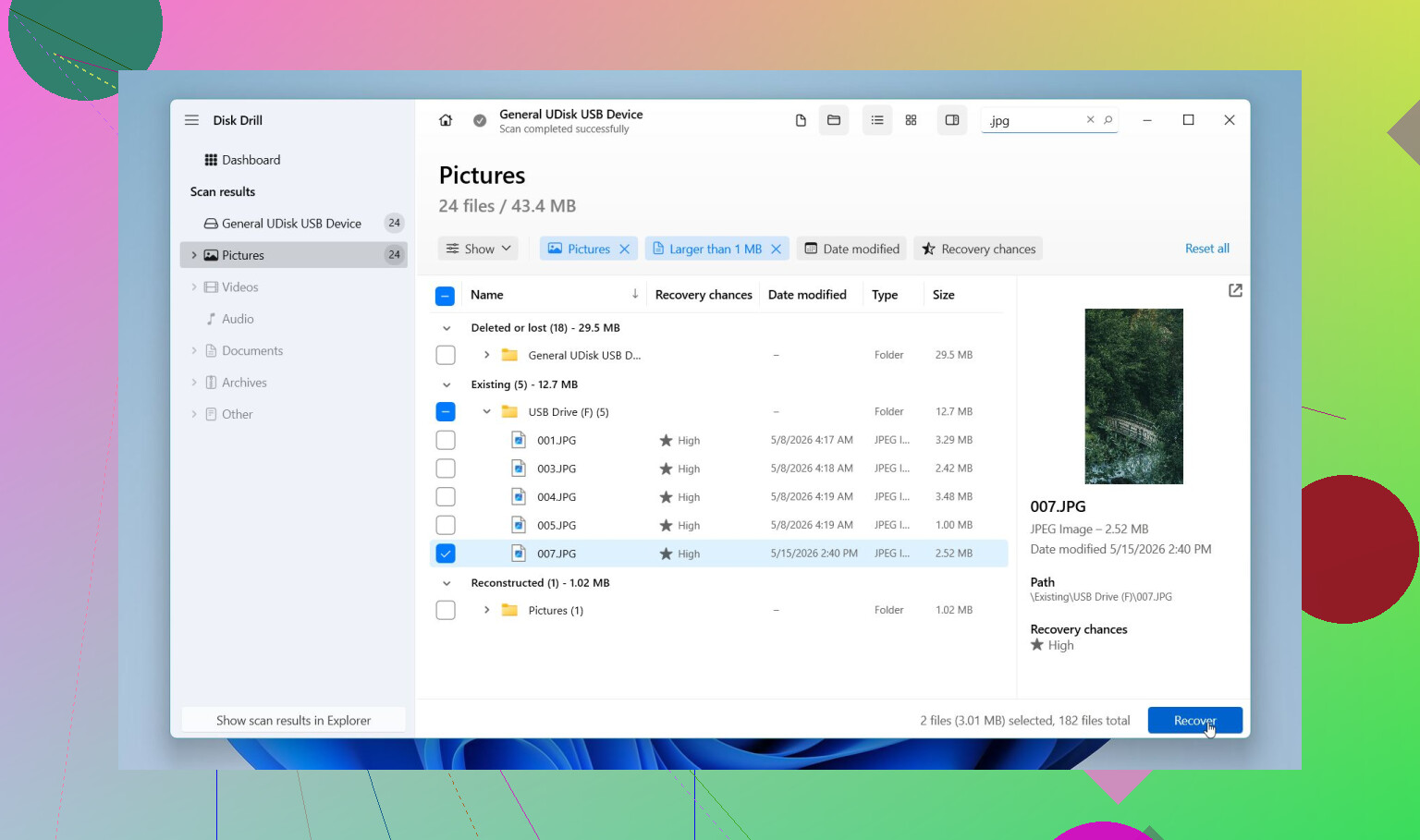
Disk Drill is where I’d start for most SD card jobs. It’s easier to deal with than a lot of the old recovery stuff, and the preview feature saves time because you see what is recoverable before writing anything out. I’ve seen it do well with deleted files, formatted cards, RAW cards, and cards with filesystem damage. It also handles camera RAW formats people run into all the time, CR2, CR3, NEF, ARW, RAF, and more. The part I’d pay attention to for SD cards is Advanced Camera Recovery. That matters when your missing files are video from cameras, drones, dashcams, GoPros, DJI gear, Insta360 units, Canon, Nikon, Sony, and similar devices. A lot of tools pull fragments and call it a win. Then the clip won’t open. This one tends to do better with split or fragmented camera video. On Windows, you get up to 100 MB free recovery, and preview is included.
PhotoRec is the free route I’d keep in my back pocket. It’s ugly, but it works. I’ve used it on cards with trashed filesystems where friendlier apps came up short. It supports a huge pile of file formats. The catch is the workflow. It isn’t friendly for beginners, and you usually lose original names and folders. You end up with a heap of recovered files and a sorting session after. Annoying, but sometimes worth it.
Recuva is fine for basic Windows cleanup jobs. If you deleted normal files from a healthy FAT32 or exFAT card not long ago, it’s a quick thing to try. It’s light, free, and easy. I would not lean on it for damaged cards, modern camera RAW formats, or broken-up video files.
UFS Explorer is more for the cases where the easy stuff fails. Formatted card, damaged filesystem, strange scan results, disk images, deeper control. It has the tools. The interface feels more technical, and I wouldn’t hand it to someone who wants a one-click fix.
R-Photo is worth checking if you’re on Windows and your target is photos or video only. It’s free for personal use, cleaner than PhotoRec, and the preview system makes life easier. The tradeoff is narrow focus. It’s for media, not every file type under the sun.
If you want the short version, I’d start with Disk Drill, preview what it finds, then recover files to a different drive. If you don’t want to spend anything, try PhotoRec or R-Photo next. And if the card looks unstable, don’t keep hammering it with repeated scans. Clone it first, then work from the copy. I learned this one the hard way, tbh.
15 Likes
If the card still mounts, I’d skip the bargain-bin tools first. Start with Disk Drill. It does a better job than most with SD cards from phones, cameras, and drones, and the preview saves time. For photos and videos, that matters more than a giant feature list.
I agree with @mikeappsreviewer on one part, stop using the card. I disagree a bit on Recuva as an early pick. It’s fine for simple deletes, but SD cards with exFAT, big video files, or partial corruption tend to expose its limits fast.
My short list:
-
Disk Drill
Best first scan. Good previews. Good file signatures. Better odds with photo and video recovery than older free tools. -
R-Photo
Free, Windows-only, cleaner than PhotoRec. Nice if you only care about media. -
PhotoRec
Strong scan engine. Messy results. Filenames often come back trashed, which is a pain. -
UFS Explorer
For nerdy cases. Great tool, less friendly UI.
Also, this roundup is decent if you want a quick side-by-side of photo recovery apps:
best photo and image recovery software for deleted pictures
One more thing people miss, if your videos come back but won’t play, the issue is often fragmentation, not total loss. Disk Drill tends to handle tihs better than free stuff. Recover to your PC, not back to the card.
If the SD card is still detected, I’d actually split this into two cases instead of just chasing the “best” app.
If it was a plain accidental delete and the card still reads normally, Disk Drill is probly the best place to start. Not because it’s magic, just because it’s fast to scan, easy to preview, and usually less of a headache than older recovery tools. For photo and video recovery from SD cards, that combo matters more than people admit. You want to see whether the files are actually intact before wasting time.
Where I kinda differ from @mikeappsreviewer and @viajeroceleste is this: I would not jump between 5 different scanners right away if the card seems healthy. Every extra pass is more stress on a flaky card, and some cheap readers are garbage. Try one solid scan first, ideally with Disk Drill, recover to another drive, then reassess. People panic and start shotgun-testing tools. That’s how simple jobs turn into messes.
If the card is unstable, disconnecting, or acting weird, then yeah, move into image-based recovery and more advanced stuff. That’s where UFS Explorer or PhotoRec can still earn their keep. PhotoRec is powerful, but it recovers like a raccoon dumped your files out on the floor. Great engine, ugly results.
Also, if your missing files are mostly pics and clips, this is a decent quick watch on photo and video recovery tools:
best data recovery software for photos and videos
My practical ranking for a detected SD card:
- Disk Drill
- R-Photo if you want free and media-focused
- PhotoRec if you’re desperate and patient
- UFS Explorer if things get technical
One last thing, if the files were deleted recently and you haven’t written anything new, your odds are usualy pretty decent. If you kept shooting video after deleting them, that’s when things get ugly fast.