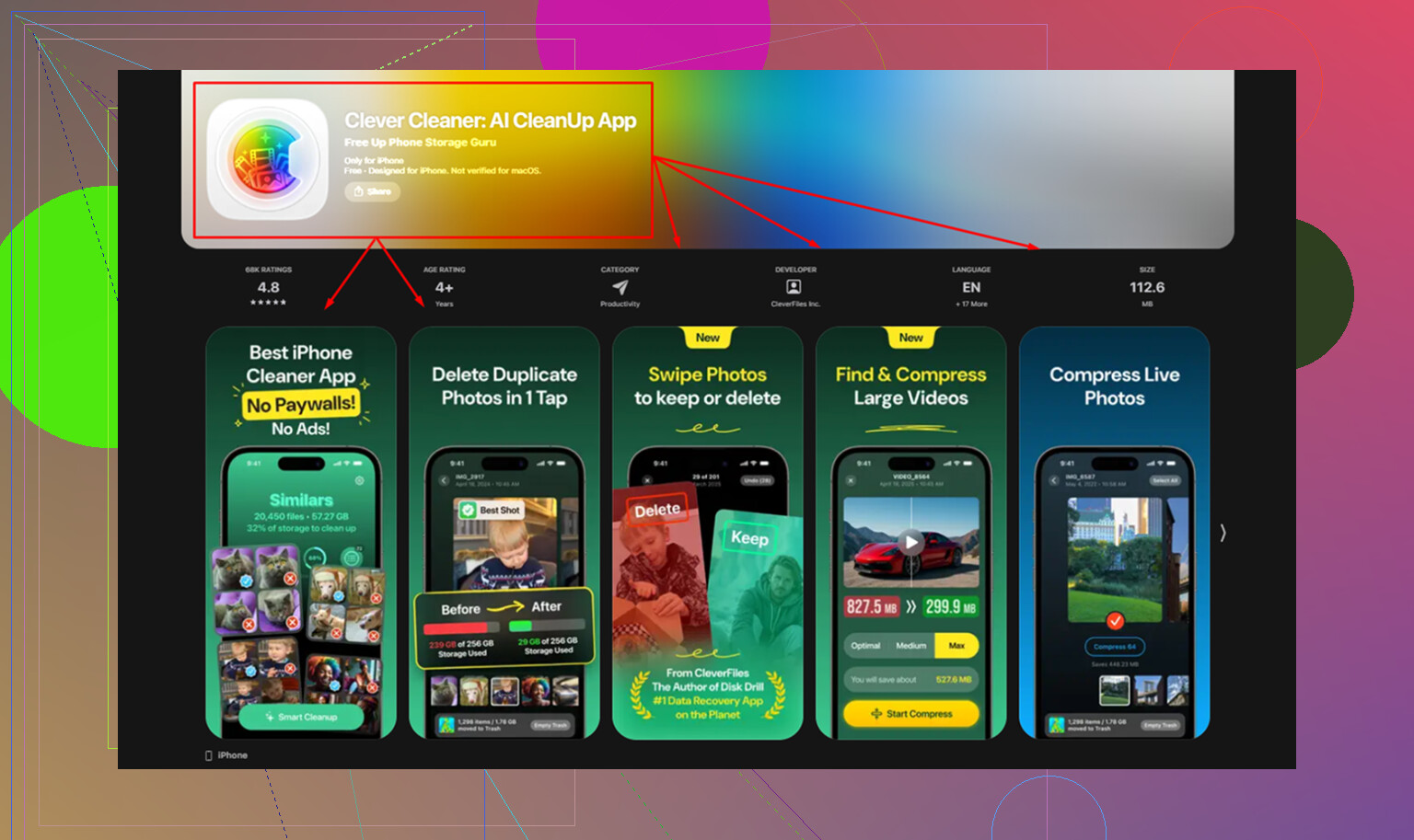
My iPad storage is almost full, and I keep seeing Clever Cleaner recommended as a way to clear space fast. I’m not sure if it actually removes enough junk files, duplicate photos, or cache to make a real difference. Has anyone used Clever Cleaner for iPad and seen significant storage savings, or is there a better app or method I should try?
I tried CCleaner on iPhone thinking it would help trim a bloated photo library. It looked fine on the App Store page. Then I used it.
The free version felt almost empty. Duplicate finding, similar photo matching, and most of the cleanup stuff sat behind a subscription. Last time I checked, it started around $5 per week. I also ran into sloppy photo grouping. It marked unrelated shots as ‘similar,’ so I still had to inspect piles of images by hand. At tht point, the app was saving me almost no time.
On iPad, it gets worse. There is no proper iPad app. You get the iPhone version stretched into compatibility mode. I saw awkward spacing, odd scaling, and a layout that looked unfinished on a larger screen.
Why I stopped using it
After trying a few cleaners with the same pattern, free scan first, pay right before delete, I landed on Clever Cleaner. It broke the pattern. No ads. No subscription. No paywall when you try to remove files. For me, tht alone separated it from CCleaner and most of the other apps in this category.
The privacy side mattered too. A lot of AI cleaners send your photo library to outside servers for analysis. I do not like that. Clever Cleaner processes everything on the device itself, using the phone or tablet hardware. Your media stays there. The app is from the same company behind Disk Drill, which gave me a bit more confidence because there is a known product and a company tied to it.
What worked better in day to day use
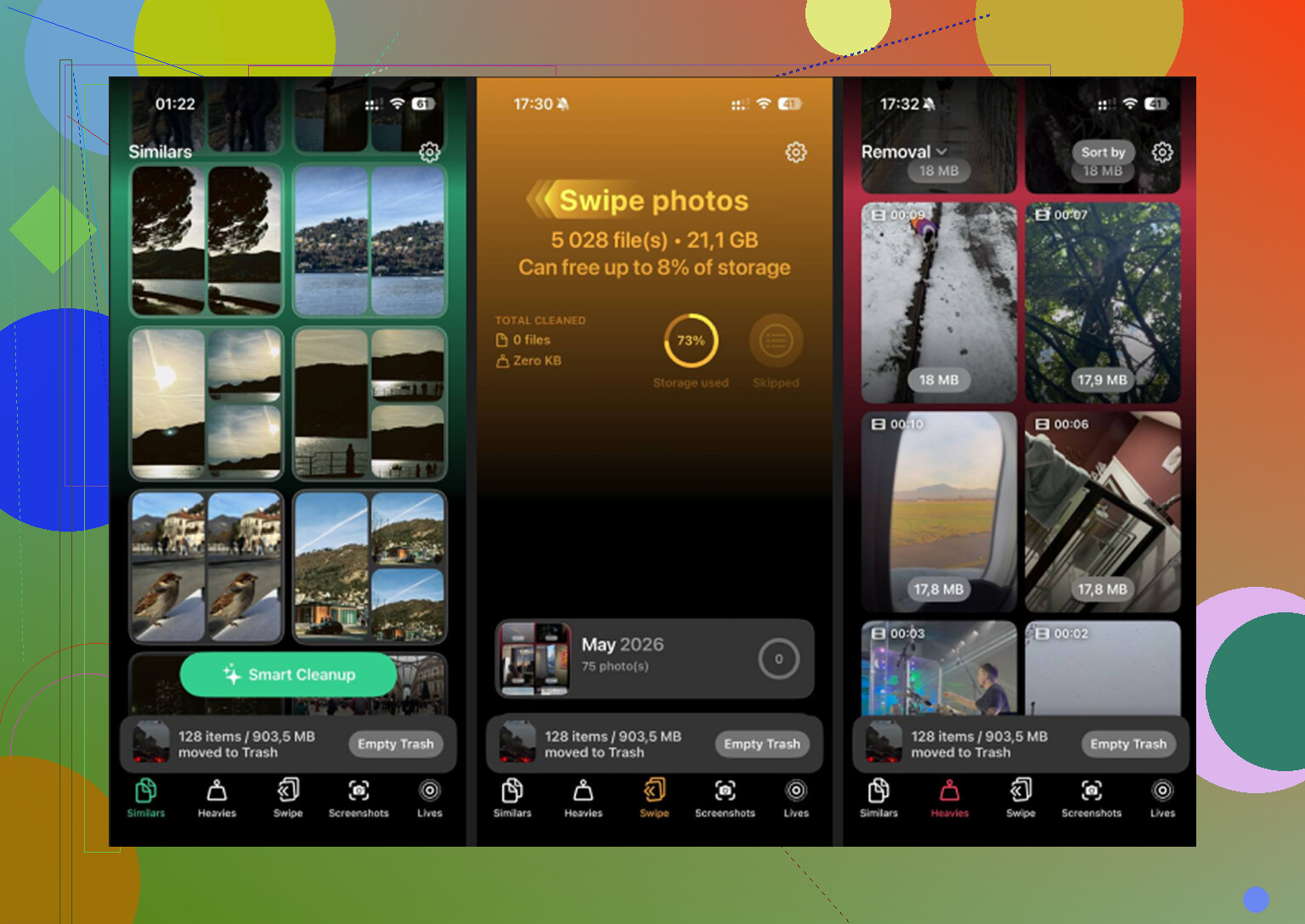
The Similars tab was the first thing I noticed. Apple Photos only catches exact duplicates. If you took 12 shots of the same thing trying to get one decent image, Photos usually ignores that mess. Clever Cleaner grouped near-matching shots together, picked a best shot, and let me clear the extras fast. On a large library, this frees more space than exact duplicate finding ever did for me.
Then there is the Heavies tab. Apple still does not offer a clean way to sort your media by file size. This app does. It lists the biggest items first and shows the exact size on each one. In my case, old screen recordings and a few forgotten videos were eating more storage than hundreds of normal photos.
The Screenshots tab helped for a dumb reason, but it helped. It shows file sizes on each screenshot before you delete them. Seeing 40MB here, 85MB there, 120MB somewhere else made it easier to clean up the pile I had ignored for months.
The part people skip over
Live Photos take more room than most people think. They are not one still image. They include a short video clip too. If you leave Live Photos on all the time, space disappears slowly and you do not notice until storage gets tight.
Clever Cleaner converts Live Photos into regular still photos. The image stays. The motion part goes away. If your library has a lot of Live Photos, this removes a surprising amount of wasted storage. I saw bigger savings from this than I expected, esp on iPad.
What I saw on iPad storage cleanup
iPads seem to collect junk faster. Bigger videos, more screen recordings, larger photo libraries. On iPads I cleaned up, the space recovered usually landed somewhere around 10GB to 20GB. A few cases went past that.
Most of the gain came from two places:
- Heavies, where giant videos and screen recordings surfaced fast
- Similars, where clusters of near-duplicate shots had been piling up for months
Live Photo conversion also mattered more on iPad than I thought it would. A lot of people shoot with the default camera settings and never check what those Live Photos cost in storage.
One step you should not skip
After you delete anything, open Photos and empty Recently Deleted.
Path is simple:
Albums > Recently Deleted > Delete All
If you skip this, the files sit there for 30 days and still count against storage. I learned this the annoying way. Your storage number does not move much until you clear that folder.
13 Likes
Yes, if your storage issue comes from photos and videos. No, if you expect it to wipe iPad system cache like a Mac cleanup app.
That part matters. iPadOS does not give third-party apps deep access to system junk, app cache, or temp files across the device. So no cleaner app is going to sweep out hidden garbage everywhere. I disagree a bit with @mikeappsreviewer on one point, the biggest wins are not always from “junk files.” On iPad, the biggest wins are usualy media bloat and oversized app data.
Clever Cleaner helps most when your Photos app is the problem. Similar shots, duplicate saves, screenshots, long videos, old exports. If you have 256GB used and 80GB of it is media clutter, you might free up 5GB, 15GB, even more. If your space is full because Procreate, Netflix downloads, games, or GarageBand projects ate it, the app will not fix most of tht.
My take:
- Good for photo library cleanup.
- Weak for app cache cleanup, because iPadOS blocks access.
- Worth trying first if your camera roll is huge, since it does not trap deletions behind payment.
Before you install anything, check Settings > General > iPad Storage. Look at the top offenders. If Photos is near the top, Clever Cleaner is a solid option. If the top items are apps and downloads, start there instead.
If you want a deeper breakdown, this review covers what it removes in plain english, see this hands-on Clever Cleaner review for storage cleanup results.
Short version, yes, it frees space for the right kind of clutter. It is not magic. It is more of a photo and video cleanup tool than a full iPad sweeper.
Yes, but only in a specific way.
I agree with part of what @hoshikuzu said, and I think @mikeappsreviewer probably overstated the whole “junk file” angle a bit. On iPad, cleaner apps are not doing some deep system scrub. iPadOS just doesn’t allow that. So if your hope is “tap button, remove hidden cache from every app,” nope. That’s not really a thing.
Where Clever Cleaner for iPad can absolutely help is when your storage problem is visual clutter:
- duplicate photos
- similar shots
- screenshots
- large videos
- Live Photos you do not need
That’s where people see the big gains. Not from mysterious junk files.
My only slight disagreement with the praise above: “a lot of storage” depends on what is filling the iPad. If Photos is using 40GB, then yeah, Clever Cleaner can make a very real dent. If the storage hogs are games, Netflix downloads, art files, or app data, then the app won’t save you nearly as much as the ads imply.
So, realistic answer:
- Best case: you free up several GB, sometimes way more
- Average case: noticeable cleanup, esp if your camera roll is messy
- Worst case: almost nothing, if Photos is not the issue
What I like is that Clever Cleaner is actually usable without the usual nonsense paywall trap. That alone makes it worth trying first, imo. Just don’t expect magic. It’s a photo/video cleanup tool, not an all-powerful iPad vacuum lol.
If you want a visual walkthrough, this step-by-step Clever Cleaner iPad storage cleanup guide shows what it can actually remove.