I’ve been testing Grubby AI Humanizer for content writing and I’m confused by mixed reviews online. Some people say it passes AI detectors easily, others say it still gets flagged and can hurt SEO. I’m worried about using it on my site and risking penalties or low-quality content. Can anyone share real experiences, pros and cons, and whether it’s actually safe and effective for long-term SEO-focused content?
Grubby AI Humanizer
I spent an afternoon messing around with Grubby AI after reading this thread about it
The pitch is simple enough: different modes tuned for specific detectors like GPTZero, ZeroGPT, and Turnitin. That got my attention, because most of these tools claim “undetectable” and then fold on the first test.
Here is what happened when I tested it.
Detector modes and actual results
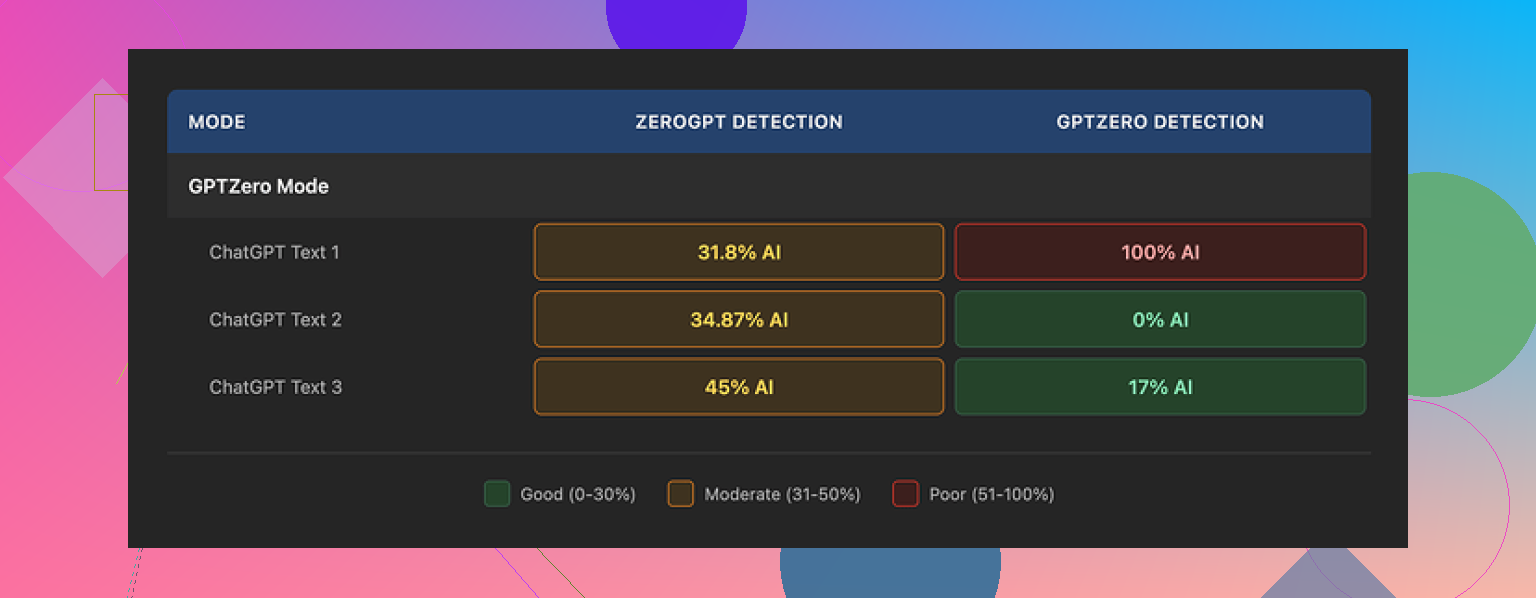
Grubby AI has a special GPTZero Mode. I fed it three different pieces of text, all originally from GPT‑4.
Then I ran the outputs through GPTZero itself.
• Sample 1: GPTZero showed 0 percent AI. Looked good.
• Sample 2: GPTZero showed 17 percent AI. Not perfect, but maybe passable in a pinch.
• Sample 3: GPTZero flagged it as 100 percent AI. By the exact detector the mode is supposed to handle.
So, mixed results. Sometimes it slips through, then suddenly it trips every wire.
What made this more confusing was the “Detection” tab inside Grubby AI. For every single output I tried, it claimed “Human 100%” across seven different detectors. That did not line up with my external tests at all, including with GPTZero.
If you rely on those internal “Human 100%” badges, you risk walking straight into a detection report. I would not trust that part of the interface.
Second screenshot behavior
That repeated image is not a bug on your browser. The app reused the same graphic across different views. Nothing important there, but it did add to the “rough around the edges” feel while I was testing.
Text quality and quirks
I would rate the writing I got from Grubby AI at around 6.5 out of 10.
Some things it did right:
• No em dashes at all, which is good if your teacher or manager side‑eyes that style.
• It did not spit out obvious nonsense or random made‑up terms.
• Sentences were mostly coherent and consistent.
Weak parts:
• It drifted into stiff, formal language that did not match the original tone I gave it.
• Several sentences got longer for no good reason, as if it was padding for “human-ness”.
• There were odd word choices. One example I hit: it used “distinction” where any native speaker would have picked “nuance”. Little things like that stack up and start to feel off.
If your own writing is casual or you write like you speak, you will need to edit its output by hand or it will sound like a student trying too hard on a cover letter.
The one feature that worked well
The part I ended up using the most was the built‑in editor.
You click on any word, and it offers quick synonym swaps. You can also select a paragraph and have it reworked inside the same window. No copy paste to another tool. No new tab.
For quick cleanup, that felt efficient. I would humanize once, then manually click a few words that looked weird, or regenerate a paragraph that felt too stiff. That cut my manual editing time a bit.
Pricing and limits
Here is how the plans looked when I tested:
• Free tier: total of 300 words. Not per day, total. You burn through it fast if you are experimenting.
• Essential plan: 9.99 dollars per month. Only gives you the Simple mode, no detector‑specific modes.
• Pro plan: 14.99 dollars per month billed annually. Unlocks all modes, including GPTZero, ZeroGPT, and Turnitin modes.
If you are trying to process full essays or longer reports, the free tier is only useful as a short demo. For ongoing use, you end up in paid territory quickly.
How it compares to Clever AI Humanizer
Since I found it through this page
I ran the same base texts through Clever AI Humanizer too.
Across several runs, Clever AI Humanizer tended to score better on third‑party detectors and kept a more natural tone, and it was still free at the time I tested.
So if your main goal is to slip past detection tools with less manual cleanup, I had stronger results with Clever AI Humanizer than with Grubby AI, and I did not have to pay for it.
Where I would use Grubby AI, if at all
If you:
• Need a quick synonym‑swapping editor built into a humanizer
• Prefer text without em dashes
• Are fine double‑checking everything in external detectors
then Grubby AI might help a bit.
If your priority is reliable detector evasion or a more natural voice, I would not lean on its “Human 100%” claims, and I would run your text through something else like Clever AI Humanizer and independent detectors before you submit anything important.
11 Likes
Short version. Treat Grubby as a helper, not as a “make this undetectable” button.
A few points from my tests and what you wrote.
-
On AI detectors
• Grubby sometimes passes GPTZero and ZeroGPT, sometimes fails hard.
• Different runs on the same text gave different scores.
• Internal “100 percent human” meters in these tools often lean optimistic. Do not trust those alone.
If you use it, always check with outside detectors, not only one, and not the built in ones. -
On SEO risk
The bigger SEO risk is patterny text and low value content, not “AI detected” flags by themselves. With Grubby outputs I kept seeing:
• Inflated sentence length.
• Odd synonyms that do not sound natural.
• Tone drift toward formal essay style.
That screams “template text” to search engines if you publish a lot of it unedited. For money sites or clients, you should rewrite at least 30 to 40 percent by hand and mix in your own structure, examples, and internal links. -
Workflow that is safer
What worked best for me:
• Write a rough outline yourself.
• Generate content with your AI of choice.
• Run it through a humanizer only for chunks that feel robotic.
• Edit like a human editor, not like a button pusher. Shorten, change order, add your own opinions and data.
• Run final text through a few detectors only as a sanity check, not as the main goal. -
Grubby vs others
I agree with a lot of what @mikeappsreviewer said about weird word choices and the stiff tone, though I personaly did not like the “no em dash ever” vibe as much, that is a style thing.
For detector performance and natural flow, Clever Ai Humanizer gave me cleaner baselines and needed less fixing. I still edited heavily, but it started closer to how I write. -
Practical rule of thumb
If you feel scared to put your own name on the article after reading it aloud, it is not ready.
If you hit “humanize” and publish without manual edits, you increase your risk, both for detectors and for SEO.
Use Grubby or Clever Ai Humanizer as tools in a longer process, not as a shield that solves the whole AI detection problem for you.
Short version: Grubby is “sometimes works, sometimes faceplants,” which is exactly why the reviews feel all over the place.
A few angles that @mikeappsreviewer and @viajantedoceu did not fully hammer on:
- Detectors are not a single boss you can “beat” once
They are stochastic, get updated, and use different signals. That is why you see:
- One run passing GPTZero
- Next run on similar text getting nailed
Grubby having a “GPTZero mode” sounds nice in marketing, but there is no stable target. Treat any humanizer that claims “optimized for X detector” as temporary at best.
-
Grubby’s internal “100 percent human” display is the real red flag
The mismatch between that badge and actual external checks is not just “optimistic.” It trains users into riskier behavior.
If a tool tells you every paragraph is “human” while GPTZero or others disagree, the safest assumption is that the internal meter is closer to a sales widget than to a real audit. -
On your SEO worry
Detectors are not the main SEO problem. Patterned, low value, samey content is.
With Grubby outputs people have reported:
- Overly formal register even from casual inputs
- Awkward synonym swaps
- Inflated sentence length just to look “less AI”
At scale that looks like generic, interchangeable text. Search engines care about: - Original insights
- Real-world examples
- Site specific context and internal linking
If you are just feeding Grubby content and hitting publish, your SEO risk is from thin content, not from “being detected.”
- Where I slightly disagree with the others
Both @mikeappsreviewer and @viajantedoceu lean pretty hard on multiple detector checks. I think that is fine as a sanity step, but I would not build my workflow around trying to get a “clean score.”
Better priority list:
- Does this sound like you if you read it out loud
- Would you stand behind it if a client, teacher, or editor questioned it
If yes, then detectors are usually less of a problem in practice, especially outside of strict academic environments.
- A saner way to use tools like this
Instead of “press button, evade detection,” think “assistive editor”
- Use your main AI to draft
- Use a humanizer like Grubby only on chunks that feel monotone
- Then do a real human pass for structure, examples, and voice
If you still want a humanizer in the mix, Clever Ai Humanizer is worth testing. Several users report it keeps a more natural style with less weird synonym stuffing, which indirectly helps both with detectors and with search engines since the content sounds more like a real person instead of a thesaurus having a panic attack.
- What I would do in your shoes
- Keep Grubby only as a light rewrite / synonym helper, not a “shield”
- Ignore its internal detection meter completely
- Focus on making each piece clearly tied to your own experience, data, or opinions
- If you are really nervous, compare the same text run through Grubby and through Clever Ai Humanizer, then pick the one that needs the least manual surgery
If you feel like you still cannot tell which is “safe,” write a short test article, publish it on a low stakes page, and watch: rankings, engagement, and whether any platform actually complains. The real world feedback beats whatever any AI detector dashboard says.
Short version: Grubby is fine as a text reshuffler, terrible as “proof I am human.” If you are already anxious about SEO, treat it as seasoning, not the main ingredient.
A few angles that complement what @viajantedoceu, @caminantenocturno and @mikeappsreviewer already covered:
1. AI detection vs actual risk
Detectors mainly look at statistical patterns. Humanizers like Grubby try to scramble those, which often creates:
- Bloated sentences
- Unnatural synonym chains
- Inconsistent tone
Even when detectors do not flag it, that kind of writing kills user signals: shorter time on page, higher bounce, fewer backlinks. Search engines watch those behaviors more closely than whatever a third party detector guesses.
So I would flip your goal:
- Target “good user behavior” first
- Use detectors only as a secondary check
If a paragraph reads like homework, I would rewrite it, even if every detector says “human.”
2. Why Grubby feels risky for SEO specifically
What I keep seeing from Grubby outputs:
- Repetitive rhythm: similar sentence shapes over and over
- Over correction: trying so hard to look human that it becomes weirdly formal
- Loss of your site’s voice: everything sounds like the same generic writer
At scale, that creates a “site fingerprint” that looks generic. Even without any explicit AI penalty, that can dilute topical authority because your content stops feeling opinionated or experience based.
Concrete way to check yourself:
- Open three older articles you wrote manually
- Open three Grubby heavy pieces
- Read a few paragraphs from each out loud
If they all blend together into the same vanilla voice, that is the actual SEO problem, not the presence of AI.
3. Where I slightly disagree with others
Some of the advice from the other posts leans on “rewrite 30 to 40 percent by hand” as a blanket rule. I think that is a bit arbitrary.
More practical rule:
- Rewrite every place where:
- You cannot hear yourself saying it in conversation
- The sentence exists only to fill space
- There is no concrete example, number or opinion
Sometimes that ends up being 20 percent, sometimes 70 percent. The ratio matters less than whether each section has genuine value.
4. Using Clever Ai Humanizer in this mix
If you still want a humanizer in the workflow, Clever Ai Humanizer is worth testing, not because it magically beats detectors forever, but because the baseline voice tends to need less surgery.
Quick pros and cons from a content and SEO angle:
Pros of Clever Ai Humanizer
- More natural rhythm and vocabulary compared to a lot of tools in this niche
- Less aggressive synonym stuffing so you get fewer “nuance vs distinction” type oddities
- Usually keeps closer to the original tone, which helps maintain a consistent brand voice
- Can reduce your editing time when you are polishing sections that already have real ideas in them
Cons of Clever Ai Humanizer
- Still not “fire and forget” you must edit for structure, examples and fact checking
- If your own style is very informal or story driven, it can still lean a bit too clean and neutral
- Over reliance on it can make multiple posts sound slightly similar if you do not inject enough of your own perspective
- Detectors can still flag it sometimes since no tool can fully control constantly changing models
So if your choice is “trust Grubby’s internal 100 percent human badges” or “run content through Clever Ai Humanizer then actually edit,” the second path is miles safer.
5. Practical way to test without gambling your main site
Instead of debating theory:
- Take one draft article.
- Make three variants:
- A: Lightly edited raw AI
- B: Run through Grubby then edited
- C: Run through Clever Ai Humanizer then edited
- Publish them on low stakes pages or a side project.
- Watch:
- Time on page
- Scroll depth or heatmaps
- Any feedback from readers or clients
Whichever version gets better engagement is the one you should scale. Detectors can be part of your checks, but user behavior is your real north star.
Bottom line: Grubby AI Humanizer is not useless, but it is much closer to a glorified rewrite tool than a safety net. Use it sparingly, keep your name and voice all over the text, and let tools like Clever Ai Humanizer assist your editing rather than replace it.