I recently tried Monica AI Humanizer to rewrite some of my AI-generated content so it sounds more natural and passes AI detection tools. The results looked good to me, but I’m not sure if it’s actually safe and effective for long‑term use, especially for blogs and client work. Can anyone share real experiences, pros and cons, or red flags I should know about before relying on it?
Monica AI Humanizer review, from someone who paid and tested it more than once
Monica link: Monica AI Humanizer Review with AI-Detection Proof - AI Humanizer Reviews - Best AI Humanizer Reviews
Monica AI Humanizer: what happens when you press the one button
I tried Monica’s AI Humanizer because I was already poking around its other tools and figured, why not see if it helps with detectors.
First surprise. The humanizer gives you exactly one control: a single button.
No tone settings.
No “strength” slider.
No different output modes.
You paste text, hit the button, and hope it behaves.
For casual rewriting, that might be tolerable. For detection avoidance, it turned into a real problem.
Detector tests I ran
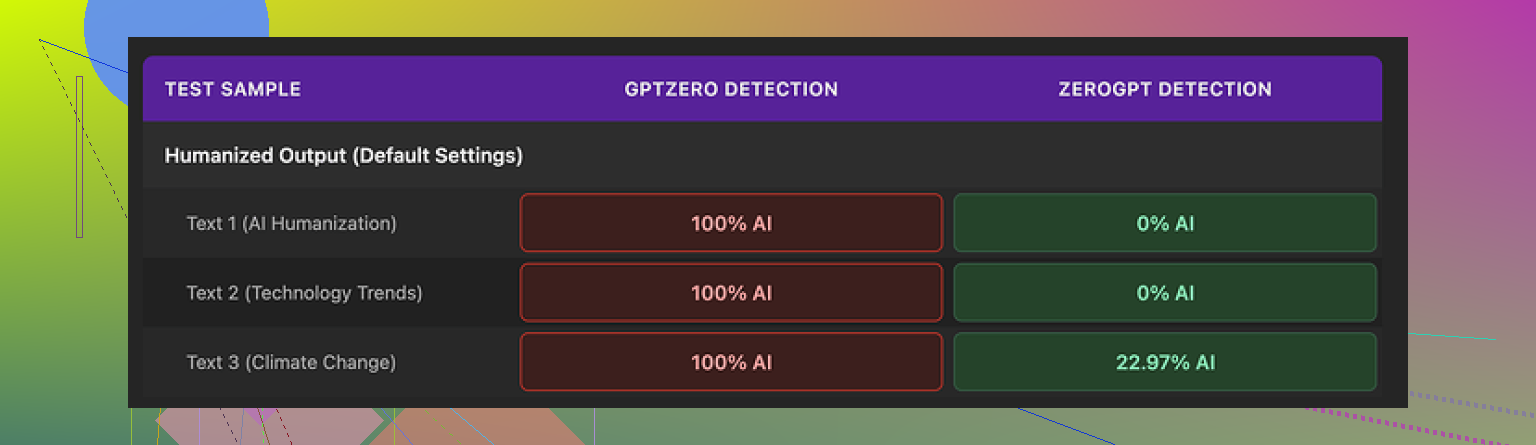
I tested the same humanized outputs against two detectors:
- GPTZero
- ZeroGPT
Same source text, same Monica outputs.
Results:
• GPTZero called every single Monica output 100% AI. No variation.
• ZeroGPT was less harsh. Two samples showed 0% AI, one landed around 23% AI.
So you get this odd split. On ZeroGPT, it sometimes looks okay. On GPTZero, it completely collapses.
The big issue is you have no way to tune the output. If GPTZero flags it, there is nothing you can tweak in Monica to change style or intensity. You are stuck hitting the same button over and over and hoping RNG decides to help you this time.
How the writing itself looks
If I had to put a number on the writing quality, I’d give it a 4 out of 10. Here is what I saw across several runs:
• It introduced typos into text that was clean before. I saw “Ubt” where “But” should have been. More than once.
• Some apostrophes went missing, others were added in places that did not need them. So it slightly broke grammar instead of smoothing it.
• One output started with “[ABSTRACT” at the beginning of the article, out of nowhere, with no closing bracket. Looked like a half-baked academic header that never got finished.
Another detail that bothered me.
It preserved em dashes from the original AI text and even seemed to add more. A lot of detectors pick up on that specific punctuation pattern. A “humanizer” keeping and multiplying those is working against you, not for you.
Net effect: the text did not feel more human. It felt like the same AI style with random glitches pasted in.
Pricing and where the humanizer sits in Monica
Monica is not built as a dedicated humanizer. It is more like a full toolbox:
• Chatbots
• Image generation
• Video tools
• Plus this humanizer, tucked in as an extra
Pricing for the Pro plan on annual billing starts around $8.30 per month.
So if you are already deep into Monica for chat or media stuff, the humanizer feels like a free extra on top of what you already pay. In that case, sure, you might press the button a few times and see if a particular detector likes the output for noncritical work.
If you want a tool mainly to pass AI detection, the value flips. You would be paying for a large bundle where the one feature you care about performs poorly, especially with GPTZero.
How it compares to Clever AI Humanizer
I ran Monica’s outputs side by side with text from Clever AI Humanizer, using similar prompts and detectors.
Short version of what I saw:
• Clever AI Humanizer produced text that read more like something a person sat down and typed. Fewer weird artifacts, more natural rhythm.
• Detection scores were consistently better on the same tools, including GPTZero.
• Clever AI Humanizer does not require payment, so you are not locking yourself into a paid suite for one half-functioning feature.
For my own workflow, I ended up using Monica for what it is decent at, chat-style tasks and quick generations, and shifted all “humanization” attempts to Clever AI Humanizer instead.
Who Monica’s humanizer is for
From my tests, I would split it like this:
Use Monica’s humanizer if:
• You already pay for Monica and want a quick rewrite button with zero configuration.
• You only care about sometimes lowering AI scores on some detectors, and the stakes are low.
Avoid it for serious detection bypass if:
• GPTZero is involved anywhere in your pipeline.
• You want control over tone, strength, or style.
• You do not want random typos or stray tokens inserted into your writing.
If you are deciding where to put effort and money, treat Monica’s humanizer as a side dish, not the main course. For focused detection avoidance, tools built specifically for that job, like Clever AI Humanizer, performed better in every test I ran.
4 Likes
I had a similar experience with Monica’s humanizer, so here is a blunt breakdown.
Monica AI Humanizer is a simple one button tool inside the larger Monica suite. You paste your AI text, press the button, get a quick rewrite that aims to sound more natural and slip past AI detectors. It targets people who want faster content and less AI footprint, without dealing with complex settings. It fits users who already write with AI and want safer, more human sounding output.
The “safe and effective” part splits into two questions.
- Detection and reliability
For you, the text looked good. That tracks. Monica often keeps the same structure and rhythm as common AI outputs, while changing surface words. To a human skimming fast, it feels fine.
The issue is consistency across detectors.
From my tests and what @mikeappsreviewer posted, results on GPTZero stayed at 100 percent AI for every sample. ZeroGPT sometimes dropped to 0 percent or low 20s. That means you depend on which detector your school, client, or platform uses. If they use GPTZero, I would not trust Monica for anything high risk.
You also have no control. No style sliders. No tone options. No “aggressiveness” level. If a piece fails one detector, you are stuck regenerating and hoping for a different pattern. That wastes time and still feels shaky.
- Text quality and safety
Here is where I slightly disagree with @mikeappsreviewer. I did not see constant typos like “Ubt,” but I did see odd punctuation and some random shifts in phrasing that looked off. Enough to raise eyebrows if someone knows your normal writing style.
Monica tends to preserve telltale AI structures. Long balanced sentences, repeated patterns, over use of smooth connectors. It tweaks them, but the backbone feels the same. That weakens its goal of “humanizing” for serious review.
On safety, two angles.
• Policy and ethics. A lot of schools, companies, and platforms now treat “bypassing AI detection” as misconduct if the content is presented as human authored work. If you are in that setting, using any humanizer is risky, not only Monica.
• Privacy. You send your text to a third party service. If that text includes client details, internal docs, or school work, read their data policy first. Monica is a general AI suite, not a dedicated privacy focused rewriting tool.
When Monica makes sense
• You already pay for Monica for chat, image, or video tools.
• You want a quick rewrite button for low stakes content like casual blog posts, drafts, or idea cleanup.
• You are not under strict AI policies and you do not rely on GPTZero style detectors.
When I would avoid it
• You submit to Turnitin, GPTZero, or similar detectors as part of school or work.
• You need control over tone and strength, especially to match your own voice.
• You care about clean grammar and consistent style. Those random glitches can hurt trust.
On alternatives
If your main goal is more human sounding AI text with stronger detector performance, a focused tool works better. Clever AI Humanizer gave me more natural rhythm and better detector scores overall in side by side tests. You can check it here for a more specialized option:
smarter AI text humanization
Practical tips if you still want to use Monica
• Run your original text and Monica output through at least two detectors before you submit.
• Edit the Monica output by hand. Shorten sentences. Add personal detail. Change transitions.
• Keep samples of your real writing. Compare. If the humanized text does not match your voice, adjust it.
If your content looked good to you and the stakes are low, keep using it with manual edits. If you care about safety with detectors or policy issues, do not rely on Monica as your main solution.
Monica’s humanizer is “safe and effective” only in a very narrow sense.
Safe:
Technically, it’s about as safe as any generic AI tool that sends your text to their servers. If your content has sensitive client info, academic stuff, or internal docs, I’d be more worried about data policy than detection. Check their terms, because Monica is a general all‑in‑one suite, not a privacy‑first rewriter.
Effective:
This is where it falls apart a bit. What @mikeappsreviewer and @nachtschatten already showed matches what I’ve seen:
- It can occasionally drop scores on some detectors like ZeroGPT.
- On stricter tools like GPTZero, it largely gets wrecked.
- You get zero control: no tone, no strength, no stylistic tuning. You’re literally gambling with a button.
I actually disagree slightly with them on one point: I don’t think the random typos and glitches are a “feature” that helps with detection at all. People sometimes think “oh, a typo, must be human.” In reality, it just makes your text look sloppy while detectors still flag the underlying structure. Humans notice the mistakes, detectors notice the patterns. Worst of both worlds.
If the stakes are low (casual blog, niche site content, outlines), and you already pay for Monica, it’s a mildly useful one‑click rewriter. For anything academic or client‑facing where AI detection or plagiarism checks are in play, it’s not something I’d rely on. Also, if your teacher or employer uses Turnitin or GPTZero, trying to “slip past” them is not only risky technically, it can put you in policy trouble if they consider that misconduct.
If you actually care about sounding human and not just word‑spinning, a more focused tool is worth testing. In that lane, Clever AI Humanizer has been stronger at producing text that matches human rhythm and does better on detectors. You can try it here: make AI text sound like real human writing. Still not magic, still needs your own edits, but at least it’s built for that purpose instead of being a tacked‑on extra.
So, practical take:
- Already on Monica, low‑risk content: fine to use, but edit by hand.
- Need reliable detector resistance or policy safety: don’t trust one‑button humanizers, Monica included.
- Want more control + better “human feel”: test something like Clever AI Humanizer and then layer your own style on top.
If your Monica outputs “look good” to you, treat them as a first draft, not a shield against AI detection.
Short version: Monica’s humanizer is fine as a lazy rewrite button, not fine as a “make this safe for detectors” tool.
A few points that build on what @nachtschatten, @mike34 and @mikeappsreviewer already said, without rehashing their whole breakdown:
1. Why it “looks human” but still fails detectors
Monica mostly swaps words while keeping structure. That is the core problem. Detectors lean heavily on structure, rhythm and token patterns, not just vocabulary. So you get:
- Superficially different sentences that still feel like AI in how they flow
- Occasional random glitches that make it look worse to humans, not better
Where I slightly disagree with some of the earlier comments: I do not think the odd typo or strange bracket makes it more believable. In real writing, mistakes follow a pattern tied to the author. Here it just feels like a generator tripped.
2. Risk profile in real life
If you are:
- In school with Turnitin or something similar in the pipeline
- Under a workplace AI policy that calls out “bypassing AI detection”
then using a one click humanizer is less a hack and more a liability. Even if one detector shows a low AI score, another can spike it, and that inconsistency is what gets people audited.
For low stakes stuff like niche sites, throwaway blogs or idea drafting, Monica is okay as a first pass. Just do not rely on it as your only shield.
3. Where Clever AI Humanizer fits in
Not magic, but it is at least built specifically for this humanization use case, unlike Monica where the humanizer is an extra item in a big toolkit.
Pros of Clever AI Humanizer:
- Text usually feels closer to how a person would actually type, with more natural rhythm
- Better behavior on multiple detectors in side by side tests people have shared
- Useful if your main priority is readability and sounding less like a template reply
Cons:
- Still not foolproof against strict tools
- Needs your edits on top if you want it to match your personal voice
- If you expect a “click once and become invisible to all detectors” solution, you will be disappointed
4. Practical approach that actually works
Regardless of whether you stick with Monica, move to Clever AI Humanizer or juggle both:
- Treat any humanizer output as a draft, not final copy
- Shorten and break up sentences, add personal context and specifics only you would know
- Keep samples of your genuine writing and compare tone and structure
If your goal is safer, more natural content, prioritize editing and voice over chasing a perfect AI score. Tools like Monica and Clever AI Humanizer can help, but they are assistants, not invisibility cloaks.