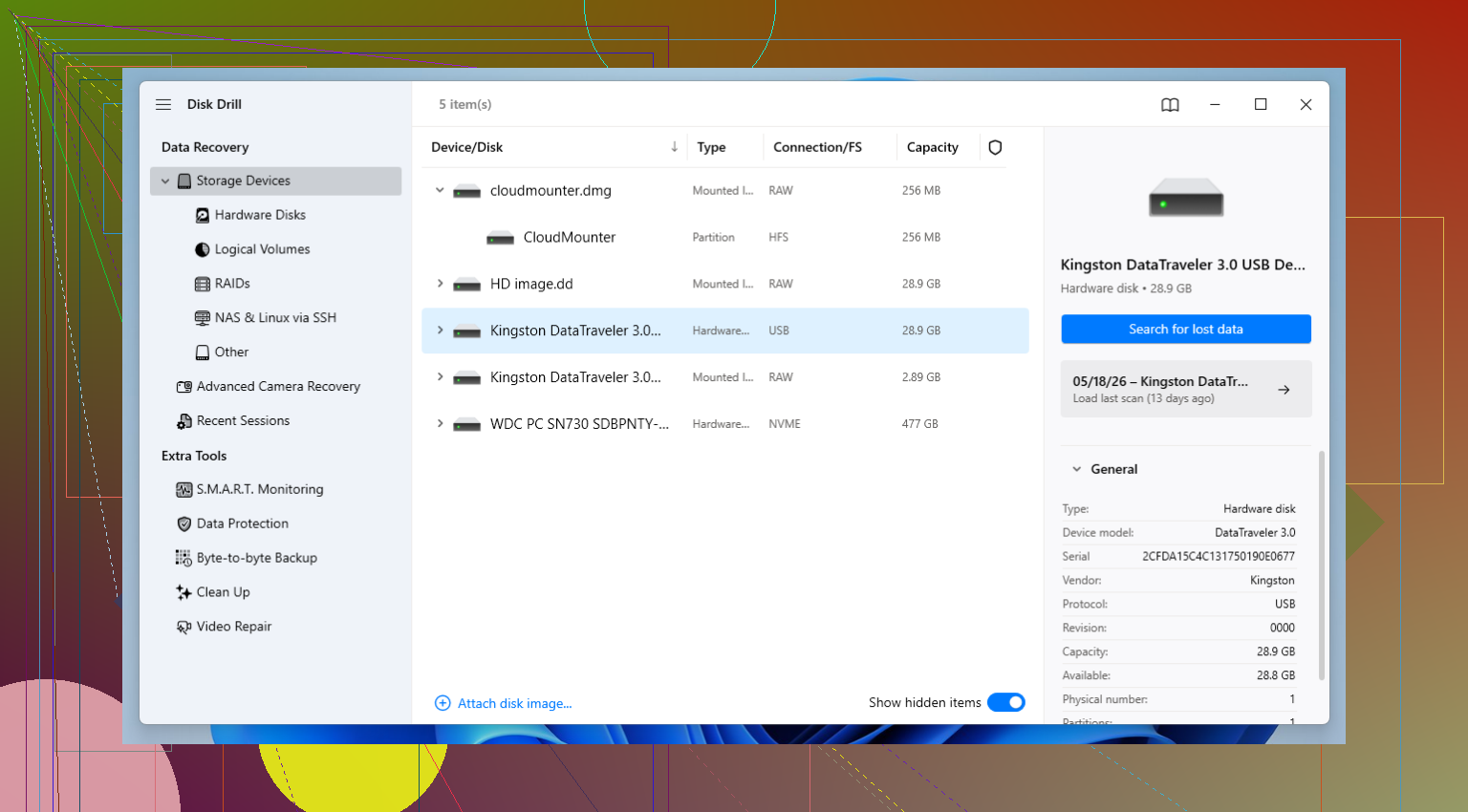
I accidentally deleted important files from my USB drive, and now I can’t access what I need. I’m not very technical, so I’m looking for the easiest USB recovery tool for beginners that can help recover lost files without complicated steps. Any advice on reliable USB data recovery software would really help.
I’ve had too many USB sticks go sideways. Mine, my brother’s, one from a coworker who walked over looking sick because Windows popped up the usual nonsense about formatting the drive. Sometimes the folder opened and showed... nothing. Years of stuff, gone from view in one shot.
After enough of these messes, I stopped treating every bad flash drive like a corpse. A lot of them aren’t dead. They’re damaged, flaky, misread, or the file system is busted. Big difference. The other thing I learned the hard way, the recovery app you pick changes the outcome more than people think.
Before you touch any software, do these two things first.
- Stop writing anything to the USB drive. If files were deleted or the file table got wrecked, your data might still be there until new stuff lands on top of it.
- Save recovered files somewhere else. Use your internal drive, another external disk, anything except the same USB stick you’re trying to rescue.
If you already did both, then fine, move on to the tool.
The one I keep going back to is Disk Drill. For me it hits the least annoying middle ground. Good recovery rate, sane layout, no need to fight the program while you’re stressed and trying not to make things worse. I’ve used it on deleted files, USB drives formatted by accident, flash drives Windows refused to read, and memory cards with weird corruption.
The preview feature helps a lot. I don’t like recovering a pile of mystery files only to find half of them are broken. Being able to check first saves time. The byte-to-byte backup option matters too. If the USB drive keeps dropping off, reconnecting, or freezing mid-scan, I usually image it first and work from the copy. Safer. Less chance of pushing a weak drive over the edge.
If you want more control and don’t mind a steeper setup, R-Studio is where I’d look next. It’s a serious tool. I wouldn’t hand it to somebody who already hates menus and technical terms. But if you know your way around partitions, file systems, scan ranges, and raw recovery settings, it gives you more room to work. I’ve seen it pull more out of ugly cases, though it asks more from you too.
For free recovery, PhotoRec still earns a spot. I’ve used it when the file system was trashed badly enough that other tools came back with scraps. It does not feel friendly, and yeah, the interface puts some people off fast. It also recovers by file signature, so your original names and folder layout usually don’t come back with the files. Messy result. Still useful. If cost is the blocker, it’s one of the few free options I’d bother with.
My rough order is this. Start with Disk Drill. If you hit a wall and know what you’re doing, switch to R-Studio. If you need a no-cost fallback, run PhotoRec and sort through the output after.
Then fix the bigger problem. Set up backups before the next drive decides to act stupid. I stick to the 3-2-1 rule because it’s easy to remember and hard to argue with. Keep 3 copies of your data. Put them on 2 different kinds of storage. Keep 1 copy somewhere else. I started doing this after losing a batch of photos years ago, and yeah, I should’ve done it sooner.
3 Likes
If you want the easiest path, I’d start with Disk Drill. It’s one of the few USB recovery tools that doesn’t feel built for IT people. You plug in the USB, scan it, preview files, then recover them to your computer. That matters if you’re new to this stuff.
I agree with @mikeappsreviewer on one point, stop using the USB right away. I don’t fully agree that you need to jump to heavier tools fast. For a beginner, extra menus usually means extra mistakes.
My simple order:
- Try Disk Drill first.
- Preview the files before recovery.
- Save them to your PC, not back to the USB.
- If the USB keeps disconnecting, stop and try another port or cable first.
If Disk Drill doesn’t find what you need, then look at free stuff like Recuva before going into more complex apps. It’s older, but for plain accidental deletion it’s still easy enouhg.
If you want a quick roundup of beginner-friendly USB file recovery apps, this video helps:
best USB data recovery software options for lost files
Short version, Disk Drill is the easiest starting point for most people. Low stress, clean layout, decent results. That’s usally what matters most when you’re panicking over deleted files.
If you want the least confusing option, I’d still lean toward Disk Drill for USB recovery, but not for the exact same reason as @mikeappsreviewer or @himmelsjager. They focused a lot on recovery features, which is fair, but for a beginner the real win is that Disk Drill doesn’t bury you in weird jargon right away. That matters when you’re already stressed and trying not to click the wrong thing.
One small disagreement though: I would not keep hopping between a bunch of tools unless the first scan clearly fails. Every extra scan can waste time and sometimes just adds more confusion. Start simple.
What I’d do:
- plug in the USB
- let Disk Drill scan it
- use preview to check if your files are actually there
- recover them to your computer, not the USB
If the drive shows up with the wrong size, keeps vanishing, or makes the whole system lag, that’s when “easy” tools may stop being enough. At that point, the problem may be more about the USB hardware than deleted files. Different issue entirely.
Also, if you want a broader read on beginner-friendly USB data recovery software and other USB recovery tool options, this thread is worth skimming:
best USB recovery software discussion for deleted and lost files
So yeah, for accidental deletion and non-technical users, Disk Drill is probably the easiest place to start. Recuva is simpler in some ways, sure, but it also feels a bit old-school and can be hit or miss depending on what actually happened to the flash drive. Sometimes simple is nice, sometimes it’s just too limited.