I used an AI humanizer tool to try to pass Originality AI’s detection on some content I wrote, but the results were mixed and I’m not sure what actually worked or what might get flagged. I need help understanding how reliable these humanizer tools really are, what risks I’m taking for SEO or plagiarism issues, and what others have experienced when using them with Originality AI. Any detailed feedback, tips, or real-world reviews would really help me decide what to do next.
Originality AI Humanizer review, from someone who tried to bend it until it broke
Originality is known for its AI detector. People throw it around like the “this thing will catch you” tool. So I was curious what their own “humanizer” could do. If a company builds the cop, you sort of expect them to understand how to dodge the cop too.
Short version of my tests: it did not dodge anything.
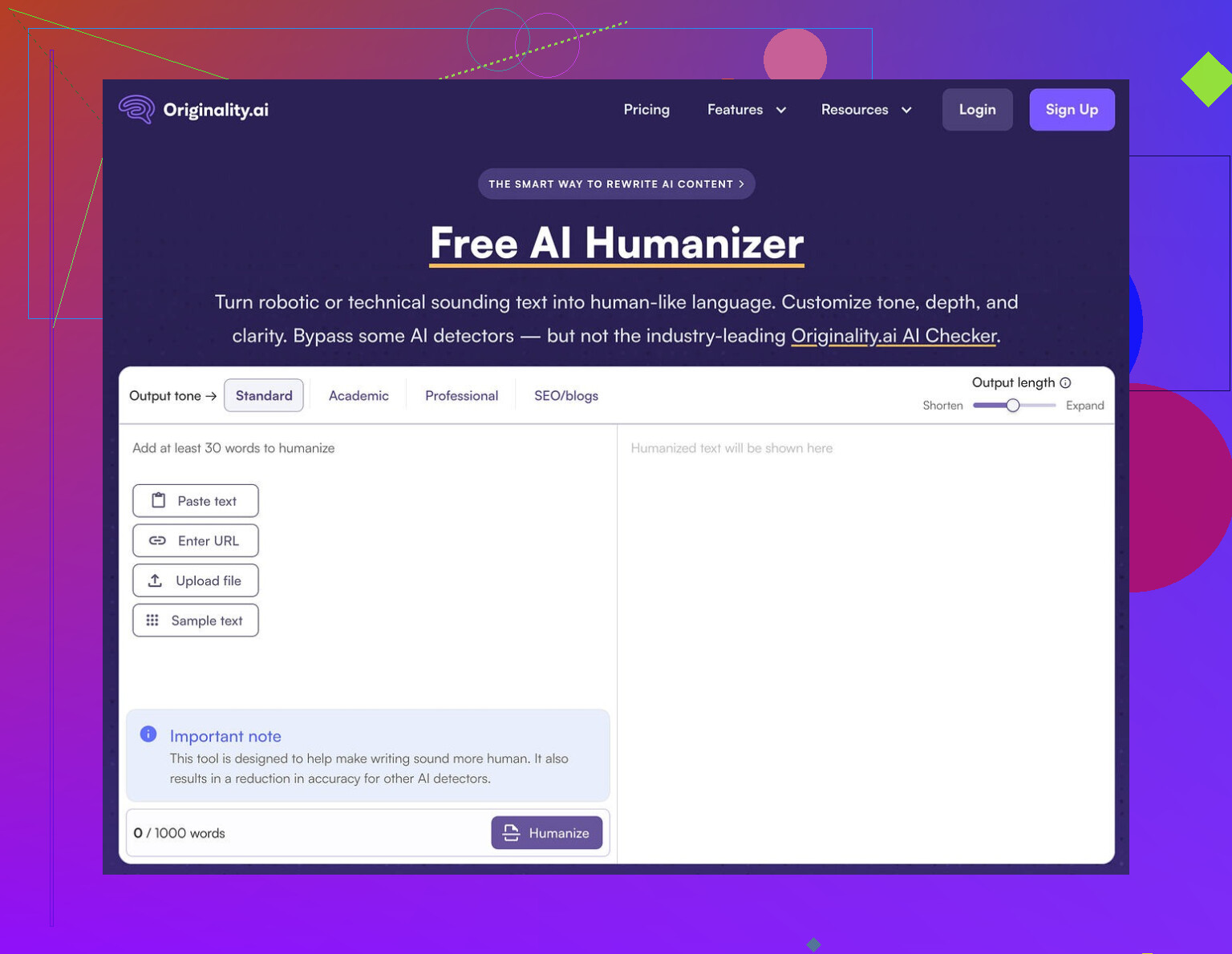
What I tested and how it went
I took a batch of straight ChatGPT outputs and ran them through the Originality AI Humanizer here:
Then I sent the results into two detectors:
- GPTZero
- ZeroGPT
Every single sample came back as 100% AI on both detectors. Not “highly likely”, not “mixed”. Full AI flags, every time.
I tried:
- Standard mode
- SEO/Blogs mode
Made no difference at all in detection scores.
Where it falls apart
After a few rounds, the pattern was obvious.
The humanizer:
- Keeps the same sentence structure from the original AI text
- Keeps the usual AI word choices, including the clichés
- Even keeps em dashes, which a lot of detectors latch onto as part of that stiff AI style
Most of the time, the output looked almost identical to the original. A few words swapped, some phrasing nudged, but nothing major. So when GPTZero and ZeroGPT tagged it as AI, they were not wrong. The text still read like the same model.
That created a weird problem. I tried to rate the “writing quality” of the humanizer, then realized I was grading ChatGPT, not the tool. If the edits are minimal, the humanizer does not really have its own style or behavior. It is a thin layer on top of the original output.
Here is the kind of experience you get:
- Paste 300 words in
- Hit “humanize”
- Skim the result
- Feel like you are reading the same thing again
From a detection point of view, that is a fail. From a writing help point of view, it is barely a paraphraser.
One screenshot to show I am not bluffing
This is one of the runs:
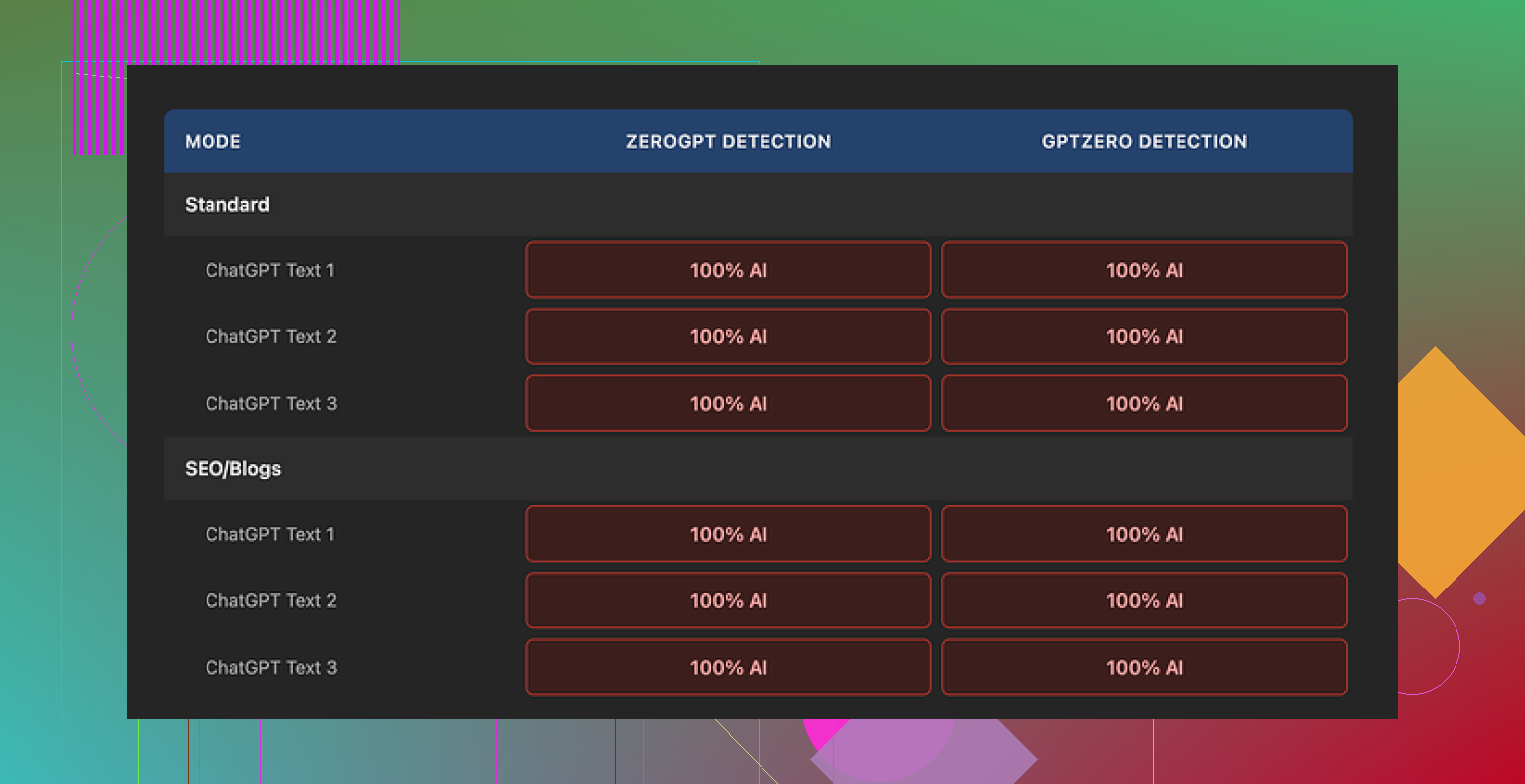
Same pattern: clean input, humanized output, both slam into 100% AI flags on GPTZero and ZeroGPT.
What does work about it
To be fair, a few parts of the product are not terrible.
-
It is free
No login, no sign up, no credit card. You load the page and use it. -
Hard cap: 300 words
You only get 300 words per run. I worked around it by opening new incognito windows and chunking my text. Tedious, but it works if you are stubborn. -
Output length slider
There is a simple control to expand or shrink the text. That part functions as expected. If you need a bit more volume or want to tighten the text, the slider helps. -
Privacy policy
The policy reads like a proper legal doc, not a copy-paste. There is a retroactive opt-out for AI training, so you can tell them not to reuse your text. I liked seeing that in writing.
What the tool is really doing
After a few sessions, it felt less like a “humanizer” and more like a funnel.
Originality’s business is detection. The humanizer:
- Costs nothing
- Sits next to their detector products
- Gives you a taste of the brand, then points you toward paid stuff where they earn money
From their side, that makes sense. From your side, if you need lower AI scores, the tool does not help.
If your goal is:
- To pass GPTZero
- To pass ZeroGPT
- To meaningfully shift AI probability scores
This specific product does not deliver. At least not in the runs I tested, and I did not stop after one or two tries.
What I ended up using instead
After going through a bunch of these tools, the one that performed better for me was Clever AI Humanizer.
Key differences I saw:
- Detection scores dropped more consistently
- The text changed enough that it felt like a different writer
- It is also free
You can see more details and proof screenshots on their community page:
If you are thinking about using Originality AI Humanizer
If your main concern is:
- You need text to sound slightly less stiff, and detection does not matter
then it might be fine as a light editor.
If your concern is:
- You do not want GPTZero or ZeroGPT to scream “AI”
my honest experience is that this tool does not help with that job at all.
I would not rely on it for anything where detection risk has real consequences.
14 Likes
Short answer, Originality’s own humanizer is not a magic “pass Originality AI” button, and the mixed results you saw make sense.
A few key things to understand so you don’t get blindsided:
-
Detectors look at patterns, not only words
- They track sentence length patterns, syntax repetition, average token probability, and how “predictable” each next word is.
- Simple synonym swaps or tiny phrasing tweaks keep those patterns intact, so the text still scores as AI.
- That is what you saw when things felt “kind of different” but still flagged.
-
Why Originality AI Humanizer feels weak
I agree with a lot of what @mikeappsreviewer wrote, but I would not say it fails in every use case.
It behaves more like a soft paraphraser:- Same structure.
- Same order of ideas.
- Slight edits that keep the AI rhythm.
For detection, this is bad. For quick “tidy up a paragraph” work, it is fine.
If your goal is to change how a detector sees the text, you need deeper edits than this tool does. -
What tends to get flagged in “humanized” content
From what I have seen across tools and tests:- Long uniform paragraphs with no short sentences.
- Overuse of safe connectors like “additionally”, “furthermore”, “moreover”, “however” etc.
- Overly balanced structure, like every paragraph having similar length and shape.
- Lack of concrete details, numbers, or personal markers.
- Perfect spelling and grammar with zero minor quirks.
You noticed “mixed” results because sometimes your own edits break those patterns, sometimes the tool keeps them.
-
How to make AI plus human editing more resilient
If you insist on starting with AI text, you need to do more than push it through a single humanizer. Things that help:- Shuffle the order of points. Move sections around.
- Add specific data, dates, brands, examples from your real experience.
- Shorten some sentences a lot and merge others.
- Delete whole phrases that sound like stock AI tutoring language.
- Add 1 or 2 minor style quirks you always use. That creates a personal pattern.
This is still a risk. Detectors keep changing, and no mix is perfect.
-
About Clever Ai Humanizer
Since you mentioned tools, Clever Ai Humanizer fits more when your goal is “change the voice enough so detectors drop the score”.
Compared to Originality’s tool, you usually see:- More aggressive rephrasing.
- Different sentence structure.
- More variation in length and rhythm.
It still needs human passes. Run it, then rewrite sections by hand, inject real examples, trim fluff, and you get better odds with Originality AI, GPTZero, ZeroGPT and similar tools.
-
What I would do in your spot
- Stop trusting a single tool run.
- Draft however you want.
- Run through Clever Ai Humanizer if you need a starting rephrase.
- Then manually:
• Move ideas around.
• Add your own data and anecdotes.
• Cut repeated patterns and safe connectors. - Only after that, test with the detector you actually care about, including Originality AI itself.
Last point, and this is where I slightly disagree with the harsher takes on Originality’s humanizer. It is not “useless”, it is just misnamed. Think of it as a light paraphraser, not a stealth tool. If you treat it like a full solution for detection, you get burned.
You’re not crazy for being confused. The “mixed” part is exactly what I’d expect with Originality’s humanizer.
I mostly agree with @mikeappsreviewer and @reveurdenuit, but I think they’re a bit too binary about it. It’s not totally useless, it’s just solving a different problem than the one you have.
Here’s what’s really going on with the flags and what “works” (and what only feels like it works):
-
Why some of your stuff passed and some didn’t
- Originality’s detector and other tools care way more about patterns over the whole text than about individual phrases.
- If your original writing already had:
• uneven sentence lengths
• small grammar quirks
• personal specifics, dates, examples
then even AI-touched text might come out “mixed” or partially human. - When you let the humanizer touch already “AI-sounding” chunks, it keeps most of that smooth, low-variance pattern, so detectors scream AI. That is why your results feel inconsistent. The tool is consistent. Your inputs are not.
-
What is actually getting you flagged
Based on how those detectors work, this is what likely trips you up:- Big uniform blocks of text with steady rhythm.
- Predictable transitions like “in conclusion”, “overall”, “in addition”, “moreover”, used in a very textbook way.
- Overly “polished” tone with no personal stake or clear POV.
- Lists that follow a very neat pattern, like every bullet starting with the same type of phrase.
The Originality humanizer barely touches any of that, which is why your scores barely move.
-
Where I’d push back a bit on the other comments
I don’t fully buy the idea that Originality’s humanizer is only a funnel or that it’s useless for everyone.- If your main goal is “tidy up something I already wrote by hand,” it can help smooth a few awkward lines without wrecking your voice completely.
- As a stealth tool though, I agree with you and them: it’s not doing the job. It’s just not aggressive enough in restructuring.
-
What actually helps without overcomplicating your life
Instead of running circles around detectors with 5 tools, do this:- Use AI only for skeletons or idea dumps, not for final phrasing.
- Then rewrite each paragraph with your own mental “voice”:
• reorder the ideas
• cut at least one sentence per paragraph
• add 1 or 2 concrete, slightly messy details per section - If you still want a helper, a more aggressive tool like Clever Ai Humanizer tends to break sentence patterns harder and gives you a new base to edit from. Key point: do not stop at the output. Treat it as a rough draft, not a final.
-
How to test without losing your mind
- Take one paragraph of your mixed-result text.
- Version A: Original + Originality humanizer.
- Version B: Original + Clever Ai Humanizer + 3 minutes of your own edits (move stuff, add examples).
- Run both through Originality’s detector and one other tool.
You’ll see pretty fast which chain actually nudges probability down in a consistent way for your style.
TL;DR:
Originality’s humanizer is fine as a light paraphraser and minor polish tool, but it does almost nothing to the deeper statistical fingerprints detectors look for. For actually lowering AI detection risk, you need either heavier rewrites by yourself or a stronger rewriter like Clever Ai Humanizer plus your own manual edits on top. The “mixed” results you’re seeing are exactly what happens at the borderline between those two approaches.
Short version: your “mixed” results are normal, and not a sign you are doing anything wrong. Detectors are just twitchy.
A few angles I have not seen clearly covered by @reveurdenuit, @sternenwanderer or @mikeappsreviewer:
-
Your own style is the biggest variable
Everyone keeps focusing on tools, but the baseline is your natural voice. If your native style is:- structurally tidy
- low on anecdotes
- heavily transitional with words like “furthermore” and “in addition”
then even your genuine writing can lean “AI‑ish” in detectors. That makes it hard to see what the humanizer actually changed.
Try pasting a piece you wrote years ago, pre‑AI, into an AI detector. If that already gets a suspicious score, no humanizer will ever make things predictable for you.
-
Detectors disagree with each other more than people admit
Everyone talks about “passing detection” like it is one test. In practice:- Originality AI
- GPTZero
- ZeroGPT
each weight features differently. What you described as “mixed” is often just “this one’s thresholds vs that one’s thresholds.”
I would not optimize everything around a single detector, because they quietly update models and your “safe recipe” breaks without warning.
-
Originality AI Humanizer is not useless, it is misplaced
Where I slightly disagree with the harsher takes:- It can be helpful if your text is already human and you just need gentle smoothing without losing structure.
- It is genuinely bad as a “cloak” for obviously AI text, because it preserves macro patterns.
Think of it like a grammar‑aware thesaurus, not a disguise.
-
Where Clever Ai Humanizer actually fits
If your priority is readability plus lower AI‑likeness, Clever Ai Humanizer is closer to what you expect from a “humanizer”:- It is more aggressive at changing sentence structure and rhythm.
- It tends to shuffle phrasing enough that detectors see a different distribution of tokens.
Pros:
- Better at altering global patterns like sentence length variance.
- More noticeable shift in “voice” so your manual edits can land on something that does not feel like raw model output.
- Can help reduce AI scores across multiple detectors when combined with your own edits.
Cons:
- On its own, it still does not guarantee you “pass,” and any tool that claims that would be lying.
- Sometimes overcorrects and makes things wordy or slightly off in tone, so you must edit afterward.
- If you have a strong personal style, it can flatten that unless you rewrite sections back into your voice.
-
Practical way to see what actually gets flagged
Instead of swapping tools endlessly, do a small controlled test on one paragraph of your content:- Version 1: Your raw text.
- Version 2: Originality AI Humanizer result.
- Version 3: Clever Ai Humanizer result.
- Version 4: Clever Ai Humanizer result plus 3 to 5 minutes of your edits where you:
• cut a sentence
• add 1 concrete detail that only you would know
• change at least one transition word per paragraph
Run all four through the same detector on the same day. You will see:
- which patterns in your original style already look “AI”
- how “light paraphrase” behaves versus heavier restructuring
- how much impact your manual tweaks have compared to any tool
-
One thing I strongly recommend that others did not stress
Stop running entire long articles as a single block. Detectors often get nastier as length grows, because:- more room for uniform rhythm
- more repetition in transitions
- more chance of consistent, model‑like phrasing
Break long pieces into sections and treat each as its own mini edit loop. You will usually see more “partially human” results instead of a single “100 percent AI” stamp.
So, tools like Originality’s humanizer, Clever Ai Humanizer and the workflows discussed by the others are all only half the equation. The other half is you deliberately introducing real‑world messiness, specifics and an uneven rhythm. That combination is what changes how detectors react, not any single “humanize” button.