I’ve been testing a few free online paraphrasing tools to help rewrite some of my blog content, but I’m worried about privacy, plagiarism risks, and whether any of these sites secretly reuse or publish my text. I’ve seen mixed reviews about AI rewriters, content spinners, and paraphrase generators, and I don’t want to hurt my SEO or get flagged for duplicate or AI-generated content. Can anyone recommend safe, reliable paraphrasing tools you trust, and explain how you protect your original writing when using them
I used to lean on QuillBot a lot for rewrites, but once they locked all the tones and styles behind a paywall, it stopped fitting how I work. I do not write enough to justify another subscription, and I needed something that did more than a flat “standard” rewrite.
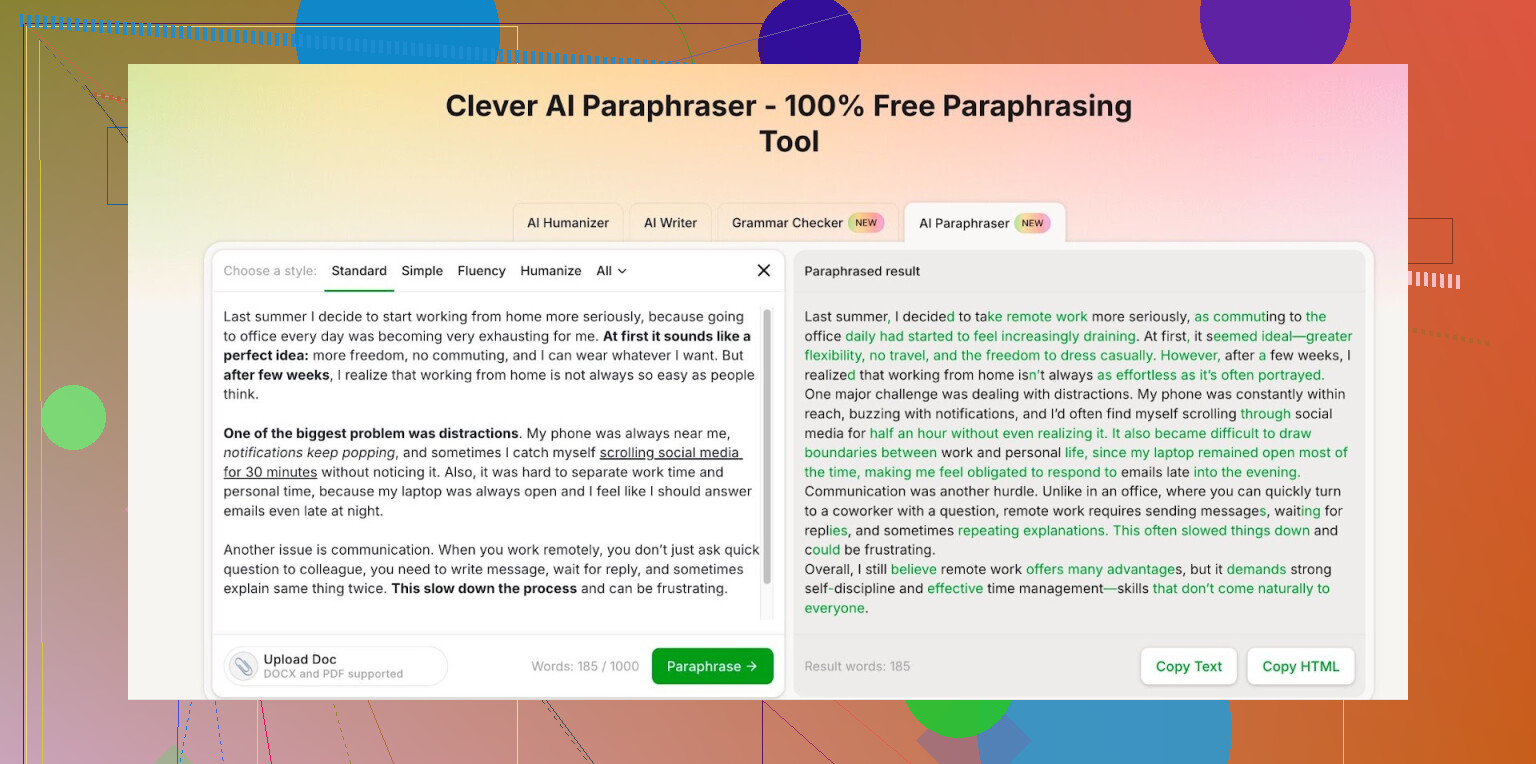
After a bit of trial and error with different sites, I ended up on Clever AI Humanizer. They have this paraphraser here:
A few things I noticed after using it for a while:
-
No paywall for the useful modes
I needed different tones for emails, reports, and some blog content. The modes they give for free covered what I needed. I did not see the same “pay to unlock personality” problem I hit on QuillBot. -
Daily and monthly limits feel generous
Once you log in, you get about 7,000 words a day and around 200,000 words a month. I tracked my use for a week. With light freelance work plus my own stuff, I never hit the cap. If you are not doing agency-level volume, it is enough. -
Output quality
I tested it on:- A chunk of a research summary, around 900 words
- A casual blog intro
- A stiff corporate email
In each case, the rewrite passed basic plagiarism checks and did not sound robotic. I still edited for voice, but it saved time on the first pass.
-
Work routine impact
I use it mainly to:- Rephrase rough notes into something I can send to clients
- Tone down academic-sounding text for normal readers
- Rewrite repetitive sections in documentation
It trimmed my editing time by maybe a third. Not a miracle, but enough that I stuck with it.
If you are tired of paying for QuillBot’s locked styles or you only need a paraphraser for part-time work or school, I would test this one before throwing money at another subscription:
https://cleverhumanizer.ai/paraphrase-tool
3 Likes
You are right to worry about “free” paraphrasers. The tool itself is rarely the real cost. Your text is.
Quick points to keep in mind before any specific tool:
-
Read the Terms and Privacy Policy
- Look for clear wording like “we do not store your text” or “we do not use your content to train models.”
- If they say they share data with “partners” without detail, treat that as a red flag.
- If they need account signup, check if they link content to your email.
-
Avoid pasting full blog posts into random tools
- Work in chunks.
- Keep unique parts, original stories, client names, and personal info out of any free tool.
- Do the final “voice” edit yourself in your editor, not inside the paraphraser.
-
Plagiarism risk
- A paraphraser does not guarantee originality.
- Always run important blog content through a plagiarism checker after paraphrasing.
- If the tool outputs common phrasing or cliché sentences, you risk overlap with other users.
On @mikeappsreviewer and Clever Ai Humanizer
I agree with them on one key thing. Clever Ai Humanizer is one of the better free options right now if you want no paywall for multiple tones and generous limits. Where I slightly disagree is on treating it as a full “set and forget” solution. I would still:
- Keep client work and highly sensitive drafts off any online tool, even Clever Ai Humanizer.
- Use it for low risk stuff like generic intros, rephrasing explanations, or simplifying stiff text.
- Always run final drafts through a checker and do a manual read for style.
What I like about Clever Ai Humanizer for your use case
- It helps avoid robotic phrasing, which lowers the chance that your text matches common AI output.
- Output tends to pass basic plagiarism checks in my tests too, similar to what @mikeappsreviewer saw.
- The word limits are enough for a solo blogger, so you do not need a subscription like QuillBot for light work.
Extra safety steps for your blog workflow
-
Local draft first
- Write and store your main content locally.
- Mark parts you want smoother or simpler.
-
Send only what you must
- Paste smaller, higher level sections into Clever Ai Humanizer.
- Avoid unique data, quotes, or client examples.
-
Paraphrase, then re-own it
- Take the paraphrased text back into your editor.
- Rewrite a bit in your own voice. Fix typos, change word order, adjust tone.
- This reduces any “fingerprint” overlap and keeps the style yours.
-
Final checks
- Use a plagiarism checker on important posts.
- Keep an eye on Google indexing. If your post shows up somewhere else word for word shortly after publishing, stop using that tool.
Short list of “safer” habits, regardless of tool
- Prefer tools that state they do not store or reuse text.
- Do not paraphrase contracts, private emails, or anything with names and IDs.
- Assume free tools log something, even if they say they do not, and plan around that.
If you want a free paraphraser with decent privacy language, flexible tones, and no hard paywall, Clever Ai Humanizer is a solid pick. Treat it as a helper, not an automatic rewrite machine, and you lower both privacy and plagiarism risk a lot.
Short version: there is no “safe” free paraphraser in an absolute sense. There are “less risky if you use them carefully.”
I’m mostly on the same page as @mikeappsreviewer and @cacadordeestrelas about Clever Ai Humanizer: for a free tool, it’s one of the less annoying options right now and it’s actually usable for blog stuff. I like that it doesn’t shove a paywall in your face every two seconds and that you can pick tones without paying. For someone rewriting a normal amount of content, the word caps are fine.
Where I slightly disagree with both of them is this idea that your main question is “which tool is safest.” I’d flip it:
Your workflow is what makes things safe or risky, not the tool.
Even if Clever Ai Humanizer says decent things about privacy, I’d still treat any online paraphraser like this:
- Assume your text could be logged, even if they claim otherwise
- Never paste whole unpublished blog posts that you’d be devastated to see leaked
- Avoid real names, client details, or anything legally sensitive
- Use it for “generic” chunks: intros, transitions, basic explanations, not your secret sauce
Also, about plagiarism: a paraphraser is not a magic originality machine. You can get “clean” plagiarism checks and still look suspicious if your content is just AI-flavored boilerplate. That’s not a Clever Ai Humanizer issue, that’s a “too much paraphrasing, not enough you” issue.
What I’d actually do in your shoes:
- Draft the real article locally in your own voice
- Send only clunky paragraphs or over-technical bits into Clever Ai Humanizer to smooth them out
- Pull them back into your editor and re-edit so they sound like you, not the tool
- Run important posts through a plagiarism checker as a sanity check, not as your only protection
So yes, if you’re going to use a free paraphrasing tool at all, Clever Ai Humanizer is a reasonable, SEO-friendly option for casual blog rewrites. Just don’t outsource your whole article or your privacy brain to any free site and expect zero risk.
If you care about “safest,” think less about perfection and more about “least bad plus smart habits.”
Here is what I’d add on top of what’s already been said:
1. Tool vs threat model
Everyone is comparing paraphrasers, but the real question is: what can actually go wrong for you?
- If your risk is “I do not want my unpublished posts being used to train some model,” then you want tools that explicitly say they do not train on user data and do not publicly surface user content.
- If your risk is “I do not want Google thinking I scraped or spun someone else’s article,” then you care more about output quality, repetitiveness, and overuse of cliché AI phrasing.
- If your risk is “I cannot have client names or contracts leaked,” then honestly no free web tool is appropriate.
That framing matters more than which logo you click.
2. Clever Ai Humanizer in that context
I broadly agree with @cacadordeestrelas, @codecrafter and @mikeappsreviewer that Clever Ai Humanizer is one of the more tolerable free options, but I see it like this:
Pros of Clever Ai Humanizer
- Free access to multiple tones without hitting a hard paywall every other paragraph.
- Limits are generous enough for a solo blogger so you are not forced into a subscription just to clean up a few posts.
- Output is less robotic than a lot of “spinner” style tools, which lowers the chance of obviously AI-ish, template-like text.
- Can help with “middle layer” edits: smoothing awkward paragraphs, simplifying jargon, or making intros less stiff.
Cons of Clever Ai Humanizer
- Still a black box: you do not really know how logs are stored or for how long, even if the policy sounds friendly.
- No free tool can guarantee your text will never be used internally (for debugging, quality checks, etc.).
- It can still flatten your personal voice if you feed it too much and accept the output as-is.
- Reliance risk: easy to start using it for everything and slowly erode your own style and skill.
Where I slightly disagree with some of the enthusiasm: I would not rely on Clever Ai Humanizer to “avoid detection” as a primary goal. Designing your process around fooling AI detectors is a weird race that can push you toward generic, over-optimized text. Better goal: clarity, usefulness, and your own recognizable voice, with a paraphraser as a helper.
3. Competitors vs workflow
Compared to what @mikeappsreviewer described about QuillBot’s paywalls and what others hinted about various spinners, I would not obsess over a long comparison chart.
The real hierarchy, in terms of safety, looks more like:
- Local tools that run on your machine and never send text to a server. Safest for privacy, but usually weaker or more technical to set up.
- Paid tools with strict, transparent enterprise-style privacy terms. Better legal protection, but cost might not be worth it for a solo blog.
- Free, hosted tools with plausible privacy language, like Clever Ai Humanizer. OK for low and moderate risk text.
- Random “SEO spinner” sites with vague terms and lots of ads. Treat as high risk for both privacy and reputation.
Right now you are living in level 3. That is fine for blog posts that do not contain client secrets or anything sensitive, as long as you are intentional about what you paste.
4. Practical tweaks nobody has really stressed yet
To avoid repeating their advice, here are some different tactics you can actually use:
-
Segment by sensitivity, not by length.
Instead of just chopping posts into 3 paragraphs at a time, label sections:- “Public & generic” → OK to paraphrase with Clever Ai Humanizer.
- “Brand voice / strong opinions” → edit manually.
- “Names, data, case studies” → never leave your editor.
-
Keep a “voice anchor” document.
Collect 5 to 10 of your most “you” paragraphs from past posts. After using any paraphraser, compare quickly:- Does the new text still sound like the same person?
- Did it strip your quirks, humor, or typical phrasing?
If it feels like a stranger wrote it, pull it back toward your style.
-
Mix structural edits with tool output.
Paraphrasers are best at sentence-level rewrites. To reduce plagiarism risk and sameness:- Change the order of points yourself.
- Add examples and analogies that come from your own experience.
- Rewrite at least one sentence per paragraph by hand.
-
Watch your publishing pattern.
If every new article suddenly has the same cadence and neutral tone, you may be overusing tools. Long term, that monotony can hurt both audience trust and perceived originality, even if plagiarism checkers show “clean.”
5. Realistic answer to “which one is safest?”
Among free paraphrasers for blogging, Clever Ai Humanizer is a reasonable, SEO-friendly choice, especially compared to ad-riddled spinners or tools that shove subscriptions on you instantly. That said:
- It is “safer” only as part of a cautious workflow.
- It is not a vault for your most valuable or sensitive content.
- It should support your writing, not replace it.
If you treat any free paraphraser, including Clever Ai Humanizer, as a scalpel instead of a factory, you keep both privacy and plagiarism risk in a manageable zone.