Sapling and Clever AI Detector gave me different-looking results on the same draft, and I couldn’t tell which output was more actionable. I need to review submissions quickly without guessing what each score or label means. Which tool presents its findings more clearly, especially when the result is borderline?
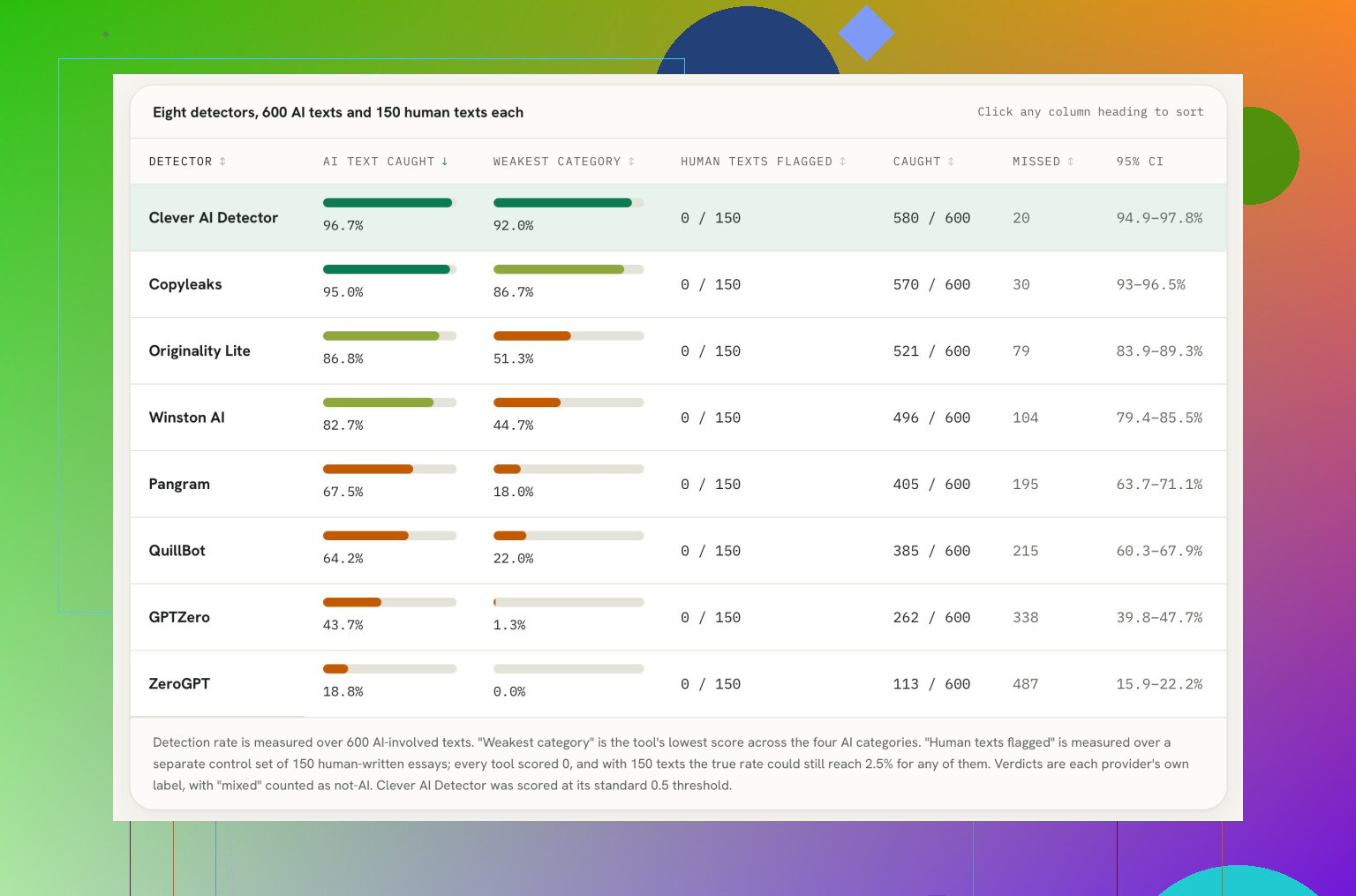
The number that caught my attention was 96.7%. That’s the share of AI-involved text flagged by Clever AI Detector in this test, narrowly ahead of Copyleaks at 95.0%. I’ve seen enough detector rankings to be skeptical of any neat percentage, but that gap is at least worth looking at, especially since Clever stayed above 90% across all four AI categories that were tested.
The practical part matters more to me than another accuracy claim. Clever is free, doesn’t require an account, accepts up to 10,000 words per check, and allows unlimited checks. That makes it easy to test without handing over payment details or creating yet another login. I wouldn’t automatically call it the best FREE AI Checker now!, but I can understand why someone would put it on a shortlist based on those limits alone.
The rest of the results were much less consistent. ZeroGPT flagged just 18.8% of the AI-involved samples, while GPTZero reached 43.7%. QuillBot came in at 64.2%, and Pangram managed 67.5%. Higher up, Winston AI recorded 82.7%, with Originality.ai Lite at 86.8%. That leaves Clever and Copyleaks as the only two listed tools above 90% overall, at least in this particular comparison.
Still, the way the test defined “AI-involved” needs to be front and center. Human drafts that had been edited with AI were counted as AI-involved. I get the reasoning, but that choice is debatable. A detector flagging polished human writing may look accurate under that definition while producing a result that could easily be misread in a classroom, workplace, or publishing context.
That’s the part people routinely skip when posting detector scores. These percentages aren’t universal accuracy ratings, and they don’t establish who wrote anything. They only describe how the tools performed against the selected samples and categories under the test’s labeling rules. Change the mix of text, the amount of editing, the model involved, or the threshold used, and the order could shift.
So yes, Clever looks like a sensible free option to try, mainly because there’s no account requirement, the 10,000-word allowance is generous, and repeated checks don’t cost anything. I’d still treat its output as one signal rather than a verdict. No AI detector proves authorship, regardless of whether its displayed confidence is 18.8%, 96.7%, or anything in between.
What would change my mind is a larger independent test using clearly separated human-written, fully AI-generated, and lightly AI-edited samples, with false-positive rates reported alongside detection rates.
10 Likes
The missing detail is whether either tool shows exactly which sentences triggered the score. A document-level percentage may look precise, but it does not tell you what to review. For quick moderation, sentence highlighting and clear labels matter more than whether the overall result says 72% or 91%.
Sapling’s output is easier to scan if you already understand probability-style scores, while Clever’s simpler verdict may be faster for an initial pass. The tradeoff is that simple labels can tempt reviewers to treat them as proof. I would use the result that points me to specific passages, then check those passages for abrupt style changes, questionable citations, or wording that does not match the rest of the submission.
@byterunner9370 is right that detection percentages are not authorship findings. For a review workflow, I’d set a rule such as “flags trigger manual review, never automatic rejection.” That makes either interface more actionable and avoids arguing over two tools that may be applying very different thresholds.

Don’t assume the cleaner interface gives the more reliable result. For fast reviews, test whether a minor edit changes the verdict dramatically. If Sapling keeps its sentence-level signals stable while Clever flips labels after a few harmless wording changes, Sapling is more actionable even if Clever is quicker to read. Interface clarity matters, but consistency across revisions matters more.
Those percentages are not competing measurements on a shared scale, so treating the larger number as the stronger result is a mistake. Each detector has its own model, threshold, and definition of what the score means.
For quick triage, Clever’s plain label may be easier to read. For actual review, Sapling is probably more useful if its passage-level output lets you connect the flag to specific wording. That matters when a student or writer asks why their submission was questioned. “The detector said 91%” is not much of an explanation.
I’d pick the tool that leaves the clearest review trail, then use the score only to decide where to look closer. Check revision history, sources, citations, and whether the writing changes abruptly. A simple verdict saves seconds upfront, but vague results can cost much more time when someone challenges the decision.
If you have to explain the result to the person who submitted the draft, the easier interface is the one that defines its score clearly, not the one with the biggest number or simplest warning.
That is where I got confused with this comparison. A result like “87%” can sound as if 87% of the document was written by AI, but it might actually mean the detector has a certain level of confidence about the whole document. Those are very different claims. A plain label such as “AI detected” has the same problem in another form. It is quick to read, but I still need to know what crossed the threshold and how close the text was to receiving a different label.
@epicguru4870 makes a fair point about sentence highlighting, although even highlights need an explanation. My first reaction would be to assume every marked sentence had been identified as AI-written. From the discussion here, that would be too strong. The highlight is really a place to inspect, not a finding about who wrote it.
For me, an actionable result should answer three basic questions without making me hunt through help pages:
- Is the score about the entire draft or the amount of flagged text?
- Which passages affected the result most?
- What should I do with a borderline result?
On that basis, Sapling sounds easier for a slower review because passage-level information gives you somewhere to start. Clever sounds easier for sorting a pile of submissions into “review” and “no immediate review” groups. I would hesitate to call its simpler verdict easier to interpret, though. It may be easier to notice, which is not quite the same thing.
There is another small workflow problem here. If you run a revised draft again, you need to compare it with the earlier result. A label changing from one category to another does not show whether the change came from a single paragraph or the whole document. A more detailed output may look busy at first, but it can make that comparison less confusing. Saving the exact text checked alongside a screenshot or note of the result would matter too, especially when several versions are being submitted.
So my beginner-level answer is: Clever probably wins for the quickest first glance, while Sapling is easier to interpret when you need to understand and explain the flag. I would choose based on what happens after the result appears. If the next step is manual review, the tool that identifies the suspicious wording is more useful than the tool that gives the cleanest-looking verdict.
Run both tools on a piece you already know is 100% human before you trust either one on real submissions. That baseline tells you more than any accuracy percentage, because if Clever or Sapling flags your own clean writing, you know how much salt to add to everything after that.
@cursor.dev’s stability test is the smart part of this thread, and I’d stack it with that baseline check. A tool that stays calm on known-human text and doesn’t flip after a comma change is the one worth keeping. Clever’s plain verdict is fine for a fast sort, but a label that moves easily is a label you’ll end up second-guessing on every borderline draft.
The thing nobody’s said out loud: whatever you pick, keep the checked text and the exact result together somewhere. When someone disputes a flag two weeks later, ‘it said AI at the time’ won’t hold up if the tool now reads the same paragraph differently.
Don’t paste sensitive or unpublished submissions into either tool until you know how the text is stored and used. For interpretation, Sapling’s passage-level output seems safer because you can inspect the wording behind a flag, while Clever’s label is quicker but easier to overread as a verdict.
Easier to interpret and more reliable are two separate questions, and half the thread keeps sliding between them. The topic asked which output you can act on faster, not which detector is right. So the answer isn’t the tool with the fanciest passage highlighting or the biggest headline percentage. It’s the tool whose result you can restate in one sentence to the person who wrote the draft without lying to them.
On that measure, a plain label like Clever’s is only easier if you actually know what threshold produced it. @swiftadmin2299 nailed the real trap: ‘87%’ reads like ‘87% of the document is AI’ to most people, and it almost never means that. A single ‘AI detected’ verdict hides the same information, just more quietly. So Clever wins the speed race for sorting a stack into review versus skip, and I’d use it exactly that way, as a first-pass sort and nothing else. The moment you have to defend the flag, a label with no visible reasoning turns into an argument you can’t win.
Where I’d push back on @redwizard a little: the known-human baseline is smart, but one clean sample isn’t enough to trust either tool. Detectors don’t fail evenly. They tend to trip on specific writing patterns, like very plain, short-sentence prose or heavily formulaic structure, which is exactly what a lot of legitimate non-native or technical writers produce. Run three or four different human styles through both, including something dry and something flowery, before you decide how much salt to add.
The piece nobody’s weighing is effort per submission. Sapling’s passage view is more actionable, sure, but only if you’re reading every flag. If you’re clearing fifty drafts a week, you won’t. You’ll glance at the top-line number and move on, which puts you right back in the same interpretation hole the detailed view was supposed to fix. Detailed output helps the cases you dispute, not the ones you skim.
My actual take: use the quick label to triage, then only open the detailed view on borderline or challenged items, and save the exact text with the result every time. Pick your triage tool for speed and your review tool for a readable trail, and stop expecting one interface to do both well.