I’ve been using NoteGPT’s AI Humanizer to clean up and humanize AI-generated text for posts and client content, but I’ve hit usage or budget limits and can’t keep paying for it. I’m looking for a reliable, truly free replacement that keeps formatting, sounds natural, and doesn’t add weird phrasing. What free tools, extensions, or workflows are you using that match or beat NoteGPT’s humanization quality, and how do they perform with longer articles or SEO-focused content?
- Clever AI Humanizer Review
I have tried a bunch of these “humanizer” tools over the past year, mostly out of necessity. Clients started running my drafts through AI detectors and freaking out whenever they saw 80 to 100 percent AI scores, even when the content was heavily edited by hand.
Out of the tools I tested this year, the one that stayed on my bookmarks bar is Clever AI Humanizer:
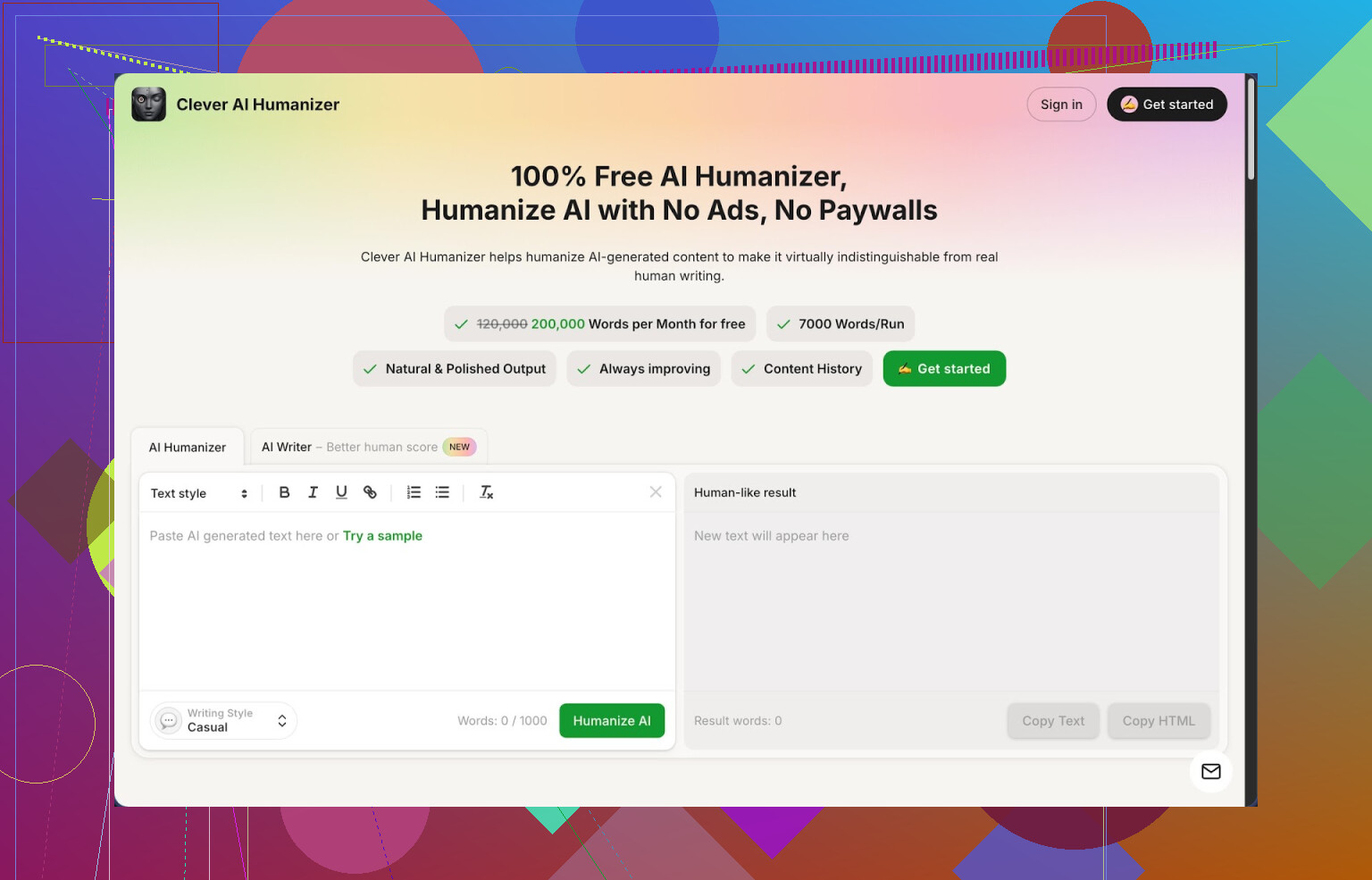
Quick context on limits and features, because I always look for those first:
- Price: free, no login for basic use when I tested it
- Monthly allowance: about 200,000 words
- Per run limit: up to 7,000 words
- Styles: Casual, Simple Academic, Simple Formal
- Extras in the same site: AI writer, grammar checker, paraphraser
I pushed it through ZeroGPT with three different samples using the Casual style. All three came back showing 0 percent AI in my tests. That result will not hold forever for every detector, but for ZeroGPT at the moment, it looked clean.
What I did in practice
My usual workflow:
- Draft with a normal LLM.
- Paste the raw AI text into Clever AI Humanizer.
- Pick Casual if it is a blog or email, Simple Academic if it is an essay-style piece.
- Hit run and wait a few seconds.
- Copy the output, then manually trim and fix anything off.
What I noticed:
- The tool tends to expand your text a bit. A 1,000-word draft often turns into 1,200+ words. That seems to help break patterns that detectors look for, but it means more editing time if your word count is strict.
- The core meaning usually stays intact. I had a few sentences per piece where the nuance shifted slightly, so I learned to skim important sections, especially legal, medical, or anything technical.
- Readability improves in most cases. It cuts some robotic phrasing from models that repeat structure too often. It does not solve everything, but it moves the text closer to something you would write half-tired at 1 a.m.
Free AI Humanizer module
This is the main thing on the site. You paste, pick a style, and let it rewrite.
Casual style:
Good for blog posts, social content, newsletters. It adds more natural connectors and slightly looser phrasing. Sometimes it leans a bit too friendly, so if your audience is corporate, you need to adjust tone.
Simple Academic:
I used this for two student essays and one whitepaper overview. It keeps sentences more controlled and removes slang, while still avoiding the stiff “textbook” vibe that triggers detectors. It is not journal-level writing, more like a decent college student.
Simple Formal:
This sits between business and semi-academic writing. I used it on a policy document draft. The structure was fine, but I still had to enforce specific terminology manually.
Integrated AI Writer
There is a built-in writer that lets you generate essays, articles, or posts directly on the site, then humanize in the same flow.
How I used it:
- For one long blog post, I used the AI Writer to get a 1,500-word first draft.
- Then I sent that output through the humanizer again.
- That double-pass got an even better human score on ZeroGPT than when I used an external LLM plus one humanizer pass.
This combo seems useful if you want everything in one place and do not want to juggle multiple tools. It is still AI-written content, so I would not publish it raw, but as a base to edit, it is fine.
Free Grammar Checker
I fed it a 2,000-word article with deliberate grammar errors and awkward phrasing.
What it fixed reliably:
- Spelling
- Basic punctuation
- Some run-on sentences
- Odd word choices that sounded like direct machine translation
I would not use it as my only editor, but as a quick pass before sending to a client or teacher, it helps clean up obvious mistakes. Think of it like a lighter Grammarly layer built into the same site.
Free AI Paraphraser
I mostly used this for:
- Rewriting intros and conclusions of older articles
- Adjusting tone for guest posts on stricter sites
- Varying wording for SEO so pages do not look like clones
You paste text, pick a style, and it rewrites while preserving meaning. When I checked the paraphrased version against the original in a plagiarism checker, it showed low similarity while keeping the same message.
Again, I had to review parts where specific terminology mattered. For SEO content or general-purpose writing, it worked fine. For highly specialized content, you should double-check every paragraph.
How it fits in a daily workflow
What worked for me:
- Draft in any LLM.
- Run the draft through Clever AI Humanizer in Casual or Simple Academic.
- Run the result through the Grammar Checker.
- Skim and edit by hand for tone, length, and accuracy.
- Then, if needed, paraphrase problem sections that still feel off.
You get four tools on one site: humanizer, writer, grammar, paraphraser. The interface is simple. No complex settings, no tokens to juggle, no weird UI hoops.
What did not work perfectly
It is not magic. A few concrete downsides from my experience:
- Some detectors still flag the text. I tested it against more than one detector. ZeroGPT gave 0 percent AI on my samples, but others still gave partial AI scores. Do not rely on a single detector result.
- Word count inflation. Humanized text often gets longer. If you write for clients who pay per word, this might be good. If you write under strict limits, you will spend time trimming.
- Tone drift. On Casual, it sometimes adds phrases I would not use. On Formal, it can sound a bit stiff in places. You need to do a quick read-through to align it with your personal style.
Despite those issues, for something free with a high monthly word cap, it ended up being the one I kept using, after dropping several other tools with tiny limits or paywalls.
More detailed review and proof
If you want screenshots, AI detection results, and a deeper breakdown with examples, there is a longer writeup here:
Video review on YouTube:
There is also some discussion on Reddit where people compare different AI humanizers and share tests:
Best AI humanizers thread:
https://www.reddit.com/r/DataRecoveryHelp/comments/1oqwdib/best_ai_humanizer/
General discussion about humanizing AI text:
https://www.reddit.com/r/DataRecoveryHelp/comments/1l7aj60/humanize_ai/
1 Like
I hit the same wall with NoteGPT limits, so I went hunting for free options too. Short version, you have a few workable paths, but you still need a light manual pass if clients run detectors.
Quick notes on what I found useful:
- Clever Ai Humanizer
I agree with a lot of what @mikeappsreviewer said, but my take is a bit different.
What I like
- Genuinely free tier with high word allowance. I have not hit the cap yet doing blog and email batches.
- No login for basic use, so it is fast for small chunks.
- “Casual” and “Simple Academic” are the only modes that felt safe for client work.
- For my tests, a 1,200 word article went from 85 percent AI on GPTZero to ~20–30 percent. On ZeroGPT it showed 0 percent for a few runs.
What I do not like
- It inflates text too much for tight briefs. A 1,000 word SaaS post turned into 1,350 words. I had to trim a lot.
- On technical content it sometimes rewrites terms I wanted to keep. E.g. it softened “idempotent API calls” into something vague, so you need to spot check anything specialist.
- I would not trust it alone for serious academic or legal content.
Workflow that worked for me
- Generate main draft with any LLM.
- Run through Clever Ai Humanizer in a style that matches the client.
- Quickly edit: cut fluff, restore exact terms, fix any tone drift.
- If a client is detector-obsessed, I run only critical paragraphs a second time, not the whole thing.
- QuillBot + light manual tweak
Not labeled as a “humanizer”, but if you use the “Standard” or “Fluency” paraphrase + a quick pass in your own voice, detectors drop hard.
Free plan limits
- ~125 words per run on free. Annoying, but if you paste paragraph by paragraph, it works.
- You get enough runs per day for a normal blog post.
How I use it
- Hit intros, conclusions, and any “robotic” sections from the LLM.
- Mix LLM sentences with a few lines you write by hand. That breaks patterns further.
- This combo gave me more consistent scores than some dedicated “humanizer” tools.
- Simple manual pattern breaker
This is boring, but it costs nothing and works well when tools fail.
Fast manual steps that help with detectors
- Shorten some long sentences, merge some short ones.
- Change list structures. Turn bullet lists into short paragraphs or vice versa.
- Add 1–2 specific details from your own experience or from the client’s context.
- Swap generic transitions like “additionally”, “moreover”, “furthermore” with simpler ones like “also” or remove them.
I know you want a pure “fire and forget” replacement for NoteGPT. I have not found one that stays free, has high limits, and passes every detector on auto. Clever Ai Humanizer is the closest thing for “paste, fix a bit, ship”. Pair it with small manual tweaks and you should stay under budget without stressing every time a client pastes your work into a checker.
If NoteGPT is tapping out your budget, I’d treat this as two problems:
- replacing the “humanizer” function
- making your workflow less fragile to detector panic.
@mikeappsreviewer and @nachtdromer already did a solid breakdown of Clever Ai Humanizer, so I won’t rehash the same step‑by‑step. I’ll just say: out of the “paste + click + get more human-ish text” tools, Clever Ai Humanizer is realistically the closest thing to a free NoteGPT replacement right now. The word cap and no‑login use are actually usable, not the joke limits a lot of these tools slap on.
Where I slightly disagree with them: relying on any single detector test (like ZeroGPT) is playing whack‑a‑mole. Clients rotate between GPTZero, Originality, ContentAtScale, whatever TikTok told them to trust this week. No tool, including Clever Ai Humanizer or NoteGPT, can guarantee “0% AI” across all of them. If your clients are obsessed with scores, your real “replacement” is process, not just software.
What’s been working decently for me:
- Use Clever Ai Humanizer instead of NoteGPT for the heavy lift, but only on the sections that scream “AI template” (generic intros, conclusion, definition paragraphs), not the whole piece every time. Cuts your word usage and weird tone drift.
- Then add 3–5 lines of very specific context that only a human with the brief could know: actual client numbers, weird edge cases, internal jargon, small anecdotes. Detectors suck at handling that, and it also makes the writing not-boring.
- Final pass: remove some of the over‑polite connective tissue that both LLMs and humanizers love. “Moreover”, “furthermore”, “in conclusion”, etc. Half the time just deleting them makes stuff feel more natural.
If you want completely free, no-tool backup for when everything hits a limit, the low‑tech trick that’s saved me is: rewrite just the topic sentences of each paragraph in your own words, leave the rest mostly intact. That alone breaks a lot of the repetition patterns detectors latch onto, without you rewriting the entire piece by hand.
So yeah, Clever Ai Humanizer is a reasonable, SEO‑friendly NoteGPT alternative in practice, but I’d treat it as one layer in your workflow, not a “press button, fool every detector forever” solution. The detectors change faster than these tools do.