I’ve been publishing Walter Writes AI Reviews and I’m not sure how real users actually feel about the content, tone, and usefulness. Analytics show views but very few comments or shares, so I can’t tell what’s working or what needs to improve. Could you review my AI tool reviews from a reader’s perspective and tell me what’s confusing, what you like, and what would make you trust and engage with them more?
Walter Writes AI review from someone who got a bit too nerdy with it
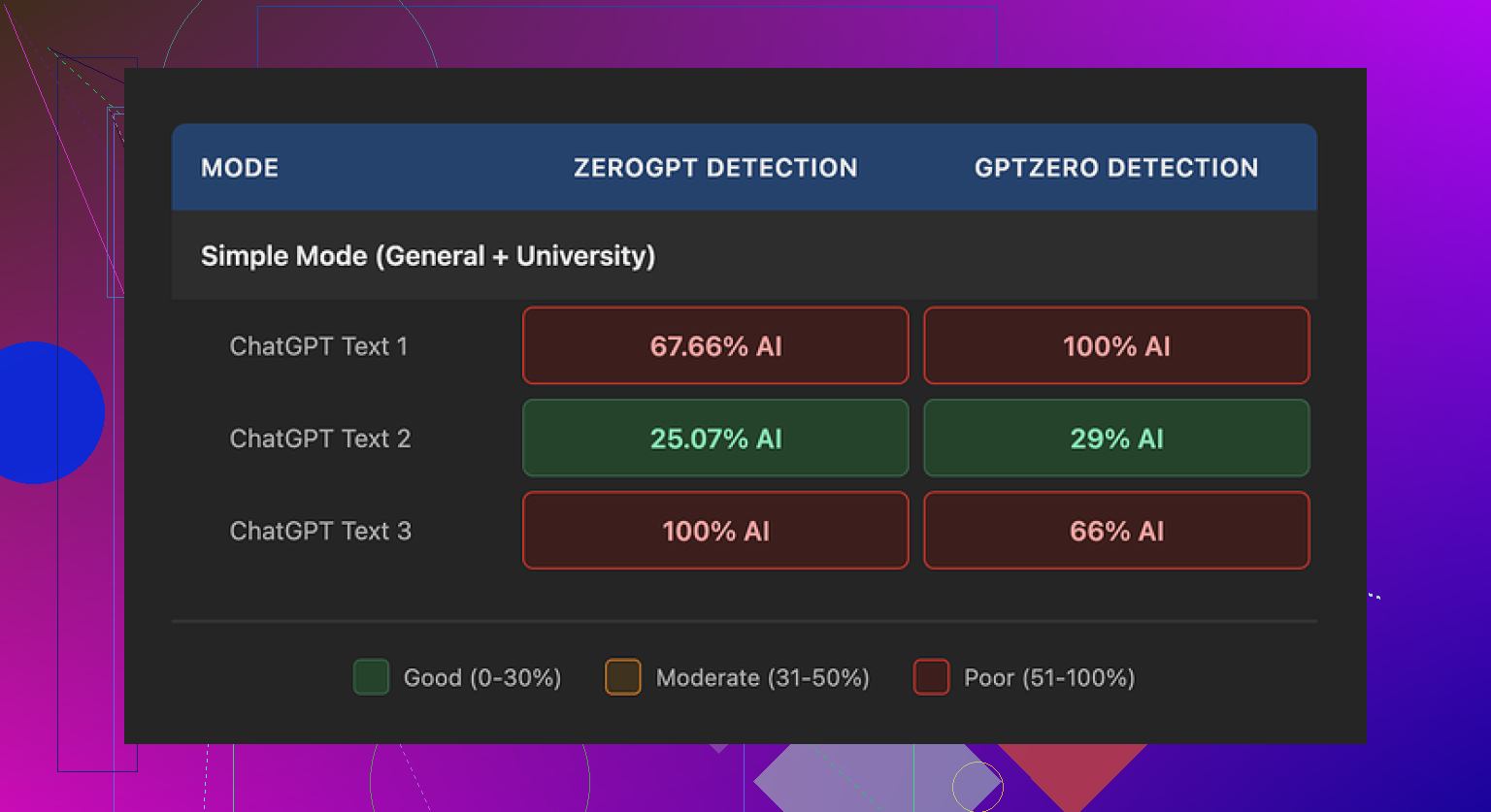
I spent an afternoon messing around with Walter Writes AI and feeding the output into detectors, and the results were all over the board.
I only used the free version, which locks you into the Simple mode. No access to the paid Standard or Enhanced modes, so keep that in mind if your experience ends up different.
Here is what happened with three test pieces:
• Sample 1
GPTZero: 29%
ZeroGPT: 25%
For something free, that score surprised me. A lot of free “humanizers” get flagged harder than raw ChatGPT text. This one slipped through better on that run.
• Sample 2
Hit 100% AI on at least one detector.
• Sample 3
Same story. One of the detectors slammed it with 100%.
So you might get one passable output, then the next one looks like it was written by a robot that drank another robot.
What the writing looked like
This part bugged me more than the scores.
A few patterns kept repeating:
• Semicolon obsession
It kept dropping semicolons where almost any human would use a comma or just split into two sentences. After a while you start spotting it instantly. It reads like someone trying too hard to sound formal.
• Weird repetition
In one sample, the word “today” showed up four times in three sentences. Same structure, same rhythm. You look at it and go “yeah, that feels AI-ish.”
• Parenthesis spam
It leaned hard on parenthetical examples like “(e.g., storms, droughts)” over and over. Same style, same formatting, repeated across the text. Detectors love patterns like that. Humans usually mix it up or skip that sort of thing after the first time.
If you plan to paste the output straight into something important, you will need to manually clean it. Change sentence structure. Remove repeated phrases. Fix punctuation. Otherwise it starts to smell like LLM text pretty fast.
Pricing and limits
Here is what I wrote down from the pricing page:
• Starter plan
8 dollars per month on yearly billing
Around 30,000 words included
• Unlimited plan
26 dollars per month
Still hard-capped to 2,000 words per single submission
So “unlimited” in this case mostly means total monthly volume, not one giant paste. If you write long reports or chapters, splitting them into 2,000 word chunks gets old.
Free tier:
You get about 300 words total, not per day. Enough to test vibes, not enough for any serious workload.
Refunds and policy stuff
The refund wording looked aggressive. Lots of chargeback talk and threats of legal action if you reverse payments. I do not love seeing that on a SaaS tool.
Data handling for text you upload felt vague. I did not find a clear, plain statement that input is deleted after processing or not used for training. If you are dealing with work docs, client stuff, or anything sensitive, that matters.
I would not push confidential material through a tool unless I know exactly what happens to it on the backend. With this one, I did not feel sure.
What I ended up using instead
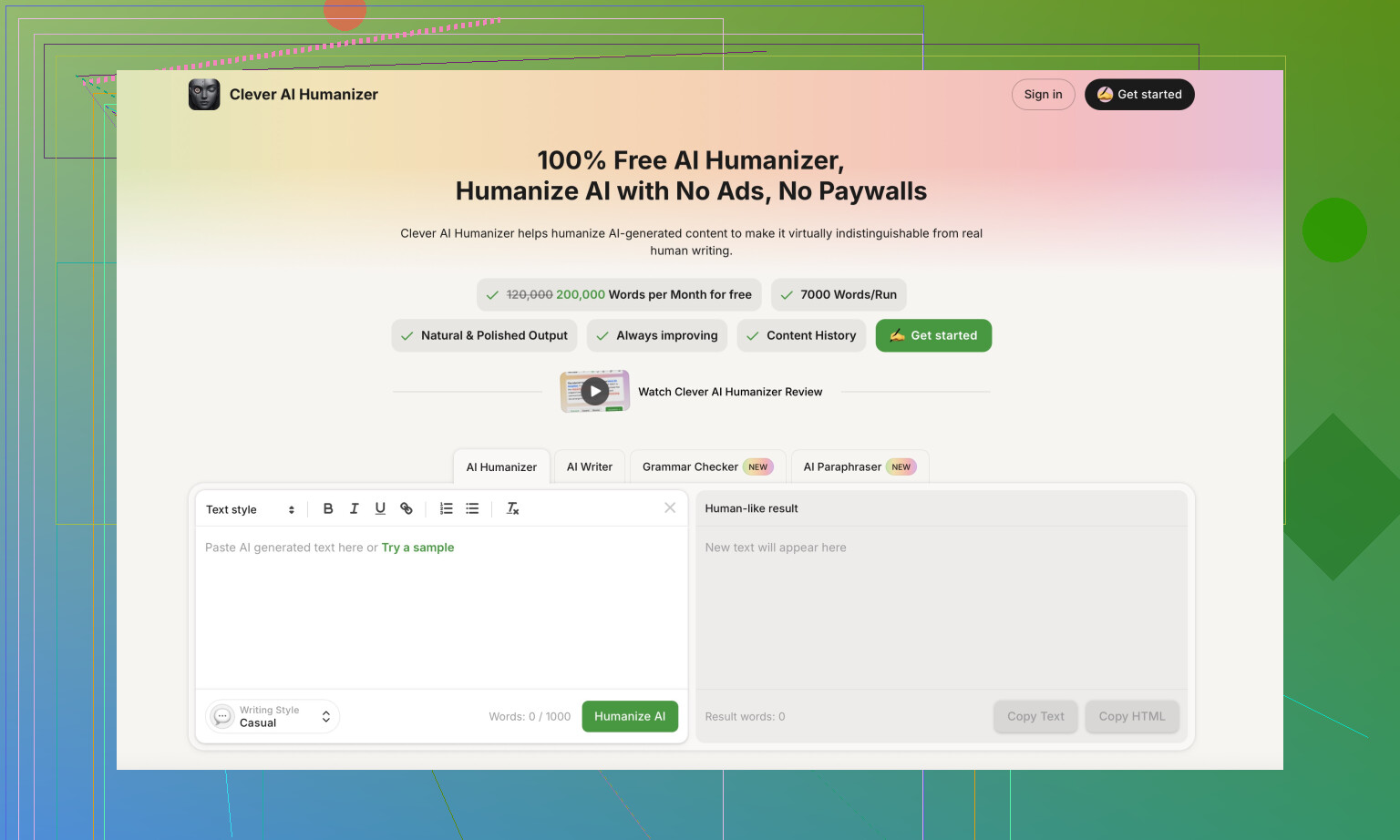
During the same testing rabbit hole, I kept going back to Clever AI Humanizer.
Site is here:
Every time I ran text through that one and then checked with detectors, the writing looked more like something I might send myself. Less robotic phrasing. Fewer obvious patterns. No billing wall for basic use when I tested it.
If you want some step by step stuff and comparisons, a few threads helped:
Humanize AI tutorial on Reddit
https://www.reddit.com/r/DataRecoveryHelp/comments/1l7aj60/humanize_ai/
Clever AI Humanizer review on Reddit
https://www.reddit.com/r/DataRecoveryHelp/comments/1ptugsf/clever_ai_humanizer_review/
YouTube walkthrough
What I would do if you are testing Walter Writes
If you still want to try Walter Writes AI:
-
Start with low stakes text
Something you can afford to have flagged. Do not begin with your thesis or a client report. -
Run every output through multiple detectors
GPTZero and ZeroGPT are the ones I used, but you can add more. Look for patterns where one detector hates it while another passes it. -
Check for these tells
• Semicolons in weird spots
• Overuse of the same time words like “today”
• Repeated parenthetical formatting like “(e.g., …)”
If you see those, rephrase aggressively. -
Keep paste size small
If you hit the 2,000 word ceiling on paid or the 300 total word ceiling on free, plan your workflow so you are not slicing mid-sentence. -
Do not skip manual editing
The tool helps a bit with detection scores on some runs, but raw output still sounds like AI in a lot of places.
Rough takeaway from my tests
Walter Writes AI had one nice low-score sample that looked promising, then two that lit up the detectors. The pricing and policy parts did not give me much confidence, and the writing style had strong AI fingerprints.
I ended up sticking with Clever AI Humanizer for most of my tests, since it gave me more natural text and did not ask for payment to get something usable.
3 Likes
You are getting views and low engagement because your reviews read more like detective reports on AI detection than user-focused buying guides.
Quick thoughts based on your Walter Writes AI Reviews plus what @mikeappsreviewer shared:
-
Your audience focus feels fuzzy
Your current angle seems to be “is this AI output detectable.”
Most readers want to know:
• Will this help me write faster or better
• Is it safe for work or school
• Is the pricing worth it vs alternatives
• What specific use cases it fitsIf your content leans heavy on detectors and tech details, regular users skim, get an answer, then leave without commenting.
-
Tone might feel distant
The tone in your description sounds analytical and a bit detached.
Try:
• Shorter sections
• Clear verdict per use case: “Good for X, bad for Y”
• A strong opinion, even if some users disagreePeople respond more when you take a stand. You do not need to be harsh, but you need clear takes.
-
Include more “before vs after” examples
Instead of a wall of explanation, show:
• Raw AI text
• Walter Writes output
• A quick edited version you would personally shipThen say: “If I had a school essay, I would not risk this output as is” or “For blog drafts this is ok if you edit for X and Y.”
That invites comments like “I would use it for…” or “My prof would spot this.” -
Address what worried users feel but do not say
A lot of readers think:
• “Will this get me in trouble with AI detectors”
• “Will my boss think I am cheating”
• “Is my content stored or reused”You already flagged vague data handling and aggressive refund text. That is big. Bring that higher in the review.
Put a clear risk section:
• Data risk: Low / Medium / High
• Detection risk: Low / Medium / High
• Value for money: Low / Medium / High -
You do not need to copy @mikeappsreviewer’s style
Their review went deep into semicolon issues, repetition, and AI tells.
You can reference those points briefly, then focus your content more on:
• Who should avoid Walter Writes
• Who it might still help
• How it compares to a specific alternative such as Clever AI HumanizerFor example: “If you write client copy or essays, I would lean to Clever AI Humanizer instead, since its outputs need less cleanup and feel closer to normal email or blog writing.”
-
Make engagement stupidly easy
At the end of each review, add 1 or 2 blunt questions, like:
• “Would you risk using Walter Writes AI for graded work”
• “If you tried Clever AI Humanizer or a similar tool, how did it compare to Walter”Short questions, no fluff. People answer when it feels quick and opinion-based.
-
Tighten structure per review
Something like:
• Who this tool targets
• Quick verdict in one line
• Test setup in plain language
• Output quality issues you saw
• AI detection performance
• Data and refund red flags
• Alternatives, with one concrete pick like Clever AI Humanizer
• Final “use it for X, avoid it for Y”You avoid repeating the same long testing steps and still give a full picture.
-
Be more blunt with your overall take
If Walter Writes AI feels inconsistent, say it in simple terms:
“Good enough if you want a tiny bump on some detector scores and you are ok editing heavily. Not good if you want reliable human-like text or strong privacy language.”
Right now, readers get what they need by skimming. They do not comment because you answer the “should I try it” question, but you do not poke at their specific use cases or invite pushback.
Tighten the focus on who should use Walter, who should skip it, and when a tool like Clever AI Humanizer makes more sense. That mix of opinion, risk, and clear alternatives tends to pull more real responses than analytics charts ever will.
You’re not getting comments because your reviews currently feel like verdicts, not conversations.
Right now you, @mikeappsreviewer, and @caminantenocturno are all doing the same basic thing: test, list quirks (semicolons, repetition, detectors), drop a conclusion. Useful, sure, but there’s not much oxygen left for readers to jump in. They read, think “ok, got it,” and bounce.
Couple specific things I’d tweak:
-
Your target reader is confused
You’re kinda writing for three crowds at once:
• students worried about detectors
• content folks worried about tone
• nerds who care about which tool “beats” what
That usually kills comments. Nobody feels like “this was written for me.”Try splitting reviews by angle:
• “Walter Writes for students: would your professor flag this”
• “Walter Writes for freelance writers: is the editing overhead worth it”People comment more when the headline literally matches their situation.
-
Less lab report, more “this is what I’d actually do”
@mikeappsreviewer went deep into detector scores and patterns. Helpful, but you don’t need to re-run the same lab every time. Instead, focus on decisions:• “If I had a deadline tonight, I’d only use Walter Writes as a light rewrite tool, not as a full humanizer.”
• “If I needed something to pass as normal workplace writing, I’d lean on Clever AI Humanizer, then do a quick human edit.”Strong, situational calls like that trigger people to argue or agree.
-
Show the tradeoffs, not just the flaws
Right now the tone across these reviews is like “yeahhh this thing kind of sucks, here’s why.” That’s fine, but it kills sharing, because nobody wants to share pure negativity.Add tension:
• “Output is inconsistent and needs heavy editing, BUT the interface is simple and the free tier lets you test the waters.”
• “Refund policy wording feels hostile, HOWEVER some users might still accept that risk if all they care about is slightly lower AI detector scores.”Readers love “it depends” breakdowns when they’re specific.
-
Make room for people to correct you
This is one place I slightly disagree with the others: you don’t need to over-explain your entire process. When you spell out everything, no one can add anything.Instead, leave a few doors open:
• “I only tested the Simple mode; if you’ve used Standard or Enhanced, did you notice fewer weird semicolons and repetitions?”
• “I didn’t push it with super long-form content because of the 2,000-word cap. Anyone here actually run a whole chapter through it in chunks?”That invites people who used it differently to flex their experience.
-
Bring user risk higher in the review
The vague data handling + aggressive refund policy is a huge emotional hook that you’re probably burying too low.Try a layout like:
• 1: “Should you trust this with work / school content”
• 2: “How human the writing actually feels”
• 3: “Where it breaks: semicolons, repetition, parentheses”
• 4: “Pricing vs something like Clever AI Humanizer”People will comment on trust and risk way faster than on “detector scores were inconsistent.”
-
Ask biased questions at the end
Not neutral ones like “What do you think.” That gets you silence. Try:• “Would you be ok sending Walter’s raw output to your boss, or would you be terrified they’d spot it as AI?”
• “If you’ve tried Clever AI Humanizer too, did you feel like it needed less cleanup than Walter’s stuff, or am I just picky?”Slightly leading, slightly personal. That’s the stuff people answer in one line.
-
Cut the “reviewer distance” by 30%
Right now the tone is: “Here is my measured analysis of this tool.”
Make it more like: “I tried this because I wanted X, and here’s where it helped and where it let me down.”Example snippet:
“I honestly hoped Walter Writes would give me ‘paste in, lightly edit, and send’ quality. What I got was ‘fix the punctuation, kill the roboty rhythms, and pray the detector is in a good mood today.’ For that kind of effort, I might as well go straight to Clever AI Humanizer and then polish by hand.”That kind of line invites “same” and “nah, mine was fine” replies.
-
Don’t obsess over comments = success
Last bit of tough love: AI-tool readers are lurkers. They’re often students, employees, or people skirting policy. They do not want their comment history to scream “I’m trying to beat AI detection.”So:
• Use comments as a bonus signal, not your main metric.
• Watch: time on page, scroll depth, and whether folks click out to tools like Clever AI Humanizer or competing products.
• Maybe add one anonymous poll in each review: “Would you actually use this for graded work: yes / no / only for drafts.”Polls get more interaction than public comments in this niche.
TL;DR version:
Narrow who you’re talking to in each post, stop explaining every step like a lab report, bring risk and real-life decisions to the front, and ask sharp, opinionated questions at the end. Mention Walter, mention Clever AI Humanizer, mention what you personally would do. That mix will pull way more real reactions, even if most of your audience still stays quiet.
You are getting views because your Walter Writes AI review is genuinely useful, but low engagement because it feels “finished.” There is nothing for people to argue with or add to.
Different angle from what’s already been said:
1. Stop reviewing Walter and start reviewing the decision
Right now, your post is structured like:
Tool → tests → issues (semicolons, repetition, parentheses) → pricing → policy → conclusion
That’s solid, but transactional. Readers silently extract “use / don’t use” and leave.
Try flipping it to:
Situation → what user wants → how Walter behaves → what you’d actually do
Example sections:
-
“You have a graded essay due in 24 hours”
- What you need: low detection risk, solid structure
- Walter Writes: inconsistent scores, visible AI fingerprints
- What I’d personally do: draft in GPT, pass through Clever AI Humanizer, then manual edit
-
“You are a content writer trying to speed up blog production”
- What you need: natural tone, predictable style
- Walter Writes: still sounds AI-ish unless heavily edited
- Verdict: ok as a light rephraser, not as a ‘final output’ tool
That reframes your review as “guide to a decision,” which is where comments show up: “In my case I’d still risk X” or “For me the detectors don’t matter.”
2. You, @caminantenocturno, @stellacadente, @mikeappsreviewer are overlapping too much
All three of you are hitting:
- Detector scores
- Odd writing quirks
- Pricing quirks
- Policy red flags
Instead of trying to out-detail them, specialize:
- Let @mikeappsreviewer stay the ultra-nerd on detection patterns.
- Let @caminantenocturno be the “this smells AI” stylistic hawk.
- Let @stellacadente carry the broader ecosystem / discovery angle.
You can become the “tradeoff reviewer”:
“Given these issues, is it still worth using, and for who, exactly?”
That alone will change how people respond, because they are not re-reading the same breakdown in four voices.
3. Your voice is too neutral for a comment-driven topic
I slightly disagree with the idea that you just need “a stronger opinion.” What you need is a sharper framing of that opinion.
Lines like:
- “Walter Writes AI is basically lottery tickets for detector scores. Once in a while you win, most of the time you get something you would not dare send as-is.”
- “If I have to spend this much time fixing semicolons and robotic rhythm, the ‘AI humanizer’ part feels more like marketing than reality.”
These invite pushback: “Not my experience,” “I used Enhanced and it was better,” etc.
Right now you sound like a lab report, which people respect but do not debate.
4. Explicitly compare the UX cost, not just the text quality
One thing you only hint at:
- 2,000 word cap per submission
- Free tier so tiny it is basically a demo
- Manual cleanup required on almost every sample
Lay it out like a user story:
“To get a safe-ish 1,500 word essay, I had to:
- break content into chunks
- run each chunk through Walter
- check several detectors
- manually kill weird punctuation and repetitions
At that point, I could have just used a decent model plus a tool like Clever AI Humanizer and then edited once.”
That “workflow pain” lens is what normal users care about more than exact detector percentages.
5. Use Clever AI Humanizer as a reference point, not a savior
You already nudged people toward Clever AI Humanizer. To keep trust and avoid sounding like an ad, spell out both sides:
Clever AI Humanizer – pros
- Outputs usually read closer to natural email / blog tone with less “robot cadence.”
- In your experience, less repetition and punctuation weirdness.
- Better baseline for “paste, tweak, and send” than Walter’s free Simple mode.
- Friendlier to quick tests if paywalls are lighter.
Clever AI Humanizer – cons
- Still requires manual editing if the stakes are high; it will not magically erase all AI fingerprints.
- If detector vendors shift their models, today’s “good” performance might degrade.
- Can give a slightly generic voice if users rely on it too heavily without adding their own style.
- For very technical or niche topics, may oversimplify unless guided carefully.
Position it as “more efficient starting point” rather than “perfect solution.” That nuance keeps your review credible and makes the Clever AI Humanizer mention feel organic and SEO friendly.
6. Ask questions that force a side
Instead of “What do you think,” try endings like:
- “If Walter Writes AI gave you one low-score sample and two that screamed AI, would you keep paying, or just move to something like Clever AI Humanizer and accept you still have to edit by hand?”
- “Is a hostile refund policy enough to make you avoid a tool, even if its best outputs look decent, or do detector scores matter more than contract vibes?”
People react to either/or framing. That is where comments appear.
7. Accept that lurkers dominate this niche, so change what you measure
Small disagreement with the idea that you should rely on comments at all. In AI-detection / cheating-adjacent topics, most of the audience will never post.
So:
- Watch how many scroll to the section where you mention alternatives like Clever AI Humanizer.
- Track clicks from your Walter review to other tool names you mention.
- Consider a 1-click poll:
- “Would you use Walter Writes for: drafts only / final work / not at all”
You will get more honest feedback from anonymous actions than from comments in this space.
If you reframe each Walter Writes AI review around the user’s decision, specialize your angle versus @caminantenocturno, @stellacadente, and @mikeappsreviewer, and treat Clever AI Humanizer as a comparative reference instead of a magic bullet, you will probably still have quiet readers, but the ones who do speak up will finally have something specific to respond to.