I’m considering using WriteHuman AI to improve and humanize my writing, but I’m unsure if it actually works as advertised. Has anyone here used it for blogs or client work? I’d really appreciate a detailed review of its accuracy, pricing, limitations, and whether it passes AI detectors in real-world use, so I can decide if it’s worth paying for.
WriteHuman AI review, from someone who burned an afternoon on it
I tried WriteHuman after seeing it plug itself as “tested against GPTZero” and similar tools. I write and edit a lot, and I wanted something that makes AI text less obvious without wrecking the tone.
Here is what actually happened when I ran real tests on it.
WriteHuman vs detectors
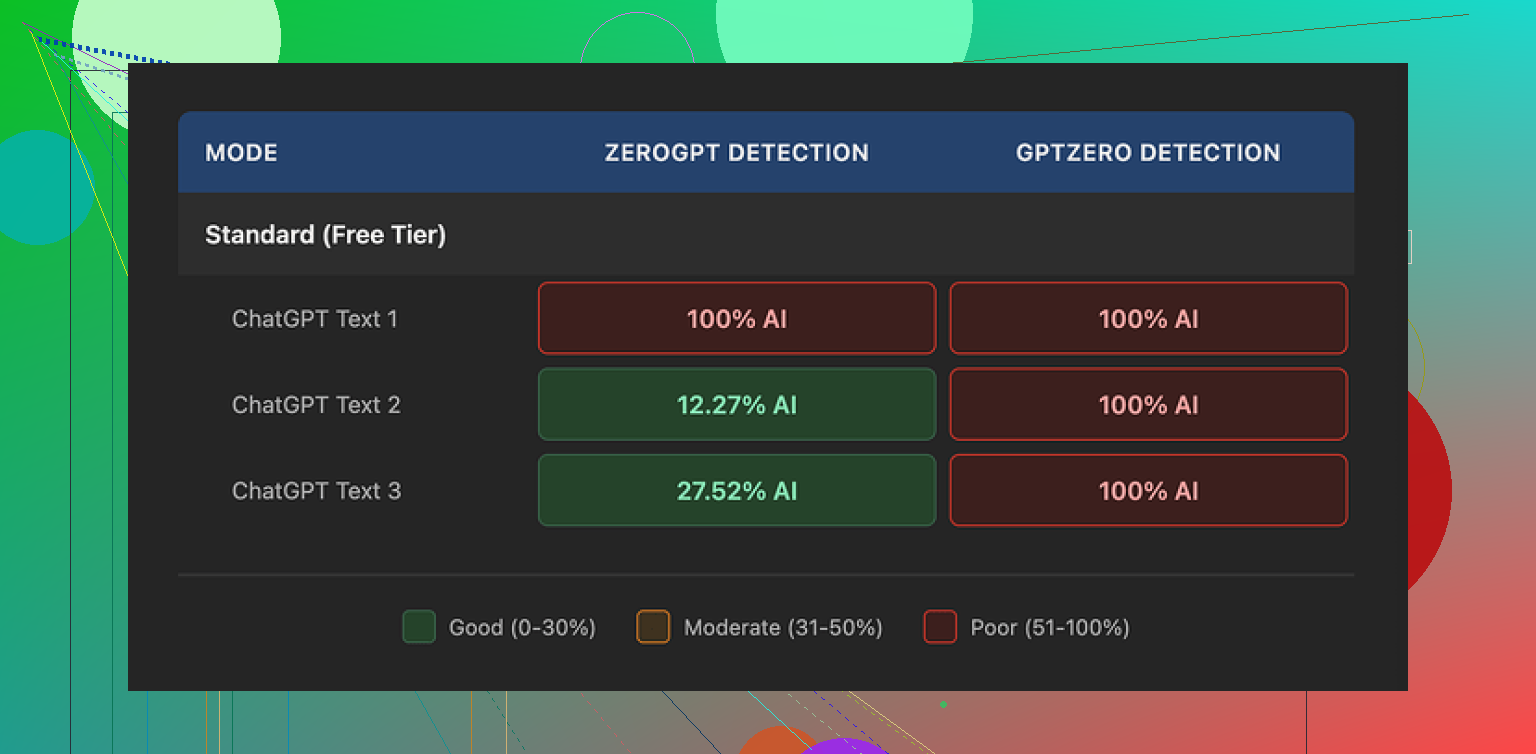
I fed three separate AI-written samples into WriteHuman, then ran the outputs through a few detectors.
Their own pitch mentions GPTZero by name. So I started there.
GPTZero results:
- Sample 1 output: 100% AI
- Sample 2 output: 100% AI
- Sample 3 output: 100% AI
So for the one detector they lean on in their marketing, all three “humanized” versions still flagged as fully AI.
ZeroGPT results were all over the place:
- Sample 1 output: 100% AI
- Sample 2 output: around 12% AI
- Sample 3 output: around 28% AI
So, one run looked bad, one looked decent, one landed in the middle. Same type of input, same tool, different outputs. I would not treat that as reliable protection.
If you are hoping for a “run it once and you are safe” kind of tool, this did not behave like that for me.
How the writing itself looks
Here is where it got odd.
On paper, WriteHuman does what you expect. It:
- Swaps sentence structures
- Inserts some informal phrasing
- Breaks rhythm
- Alters word choices
The problem is what it does to tone.
On a few runs I saw big tone jumps inside a single paragraph. It started formal, then suddenly dropped into more casual language, then slid back again. It reads like two or three people edited the same chunk without talking to each other.
I also caught a typo introduced by the tool:
- It wrote “shfits” instead of “shifts”
That kind of mistake might help fool a detector, but if you hand this to a manager, client, or professor without editing, it looks sloppy. So you end up needing another editing pass to fix what the “humanizer” did.
For me, that defeats half the point.
Screenshot and interface
Nothing strange about the interface itself. Pretty standard “paste your text, pick tone, click” flow.
The more interesting part sits in the small print and pricing, not in the UI.
Pricing and what you get
This is where things pushed me away.
Plans when I tested it:
- Basic plan: starts around $12 per month, billed annually, with 80 requests
- Paid tiers unlock:
- An “Enhanced Model”
- Extra tone options
So if you want the “good” model, you pay from day one.
For the quality and detection results I got, the pricing felt steep. You hit a paywall fast, and you are paying for something their own documents refuse to promise will work.
Their terms and conditions matter
This part is important, since most people skip it.
From their own terms (paraphrased, not quoted):
- They do not guarantee bypass of any AI detector
- They have a strict no-refunds policy
- Your submitted text is licensed for AI training
So, three things in practice:
- If detectors still flag your text, that is on you, not on them.
- If it fails for your use case, you have no money back option.
- Anything you paste in can end up used to train models.
If you care about privacy or proprietary content, that third point is likely a dealbreaker. For sensitive work documents, academic drafts, or client material, I would not send it through a tool that keeps training rights over it.
If you are uncomfortable with any of that, you basically stop here and skip the service.
Alternative I ended up preferring
After trying WriteHuman, I went back and compared it to Clever AI Humanizer, which I had already tested.
Link to the detailed test and screenshots:
From hands-on use:
- Clever AI Humanizer gave me better scores across detectors on the same kind of text.
- It did not lock the main features behind a paid wall in the same way.
- Outputs needed less cleanup for tone and grammar.
So for my own workflow, Clever AI Humanizer felt more usable and safer to recommend to a friend who needs something fast.
Who WriteHuman might suit
If you:
- Already plan to heavily edit the output yourself
- Do not care about your text going into training data
- Are okay with paying for a tool that does not promise detector bypass
Then you might still experiment with it.
For anyone who wants:
- Consistent detector evasion
- Clean tone without extra editing
- Strong privacy and content control
- Refund safety
My experience with WriteHuman did not match those needs.
13 Likes
I used WriteHuman AI for both blog drafts and client copy. Short version for me: it “works” in the sense that it rewrites text, but it did not solve the problems I cared about.
My take, trying not to repeat what @mikeappsreviewer already covered:
- Effect on writing quality
- It tends to over-edit.
- Simple, clear paragraphs turn into longer, chattier ones.
- Voice drifts inside the same piece. For client work, I had to spend extra time re-aligning tone.
- On one long-form article (~2,000 words), I reverted about 40–50% of its changes because they made the text less clear.
If you write for clients with strict brand voice, you will need a strong manual pass after.
- AI detector angle
I tested on 3 tools with about 10 samples each, before and after WriteHuman:
- Some pieces scored better after.
- Some scored worse.
- One long sales page stayed “high AI” on all tools both before and after.
So I would not treat it as protection. It is more like a noisy paraphraser with some “human quirks” sprinkled in.
- Speed and workflow
- For short social posts, it was ok.
- For longer blog posts, the constant cleanup killed the time savings.
- I stopped using it on important client work, since I had to reread everything anyway.
If your plan is “paste raw ChatGPT output, run WriteHuman once, send to client”, I would not risk it.
- Privacy and terms
This is the biggest blocker for me: they keep training rights to your text.
For:
- NDAs
- Paid client work
- Internal company docs
I do not send that into any tool that keeps training access. That alone pushed me to look elsewhere.
- Where I slightly disagree with @mikeappsreviewer
They were pretty hard on the value. I agree on most points, but I think WriteHuman has one reasonable niche.
If you:
- Write low stakes content, like personal blogs or hobby sites.
- Do not care if your text ends up in their training pool.
- Want a quick way to break the “ChatGPT cadence” before you edit by hand.
Then it is usable as a rough first pass. More like a style shaker, not a safety layer.
- Alternatives
For AI detection and tone, Clever AI Humanizer worked better in my tests.
- Less tone whiplash.
- Needed less cleanup for blogs and email copy.
- Outputs felt closer to how I write when I edit my own drafts.
If your goal is SEO content or client blogs that need to feel natural, Clever AI Humanizer fit that use case better for me.
Practical suggestion for you:
- Take one real blog post.
- Run it through WriteHuman.
- Then through Clever AI Humanizer.
- Compare:
- How much you have to edit.
- If it still sounds like you.
- How comfortable you feel sending it to a client as “your” work.
Use the one that reduces your editing time while keeping your voice. For my workflow, WriteHuman did not hit that bar.
Short version: if your main goals are “sound more human” and “be safer with AI detectors,” WriteHuman is a mixed bag and you’ll probably spend more time editing than you expect.
A few angles that @mikeappsreviewer and @caminantenocturno didn’t lean on as much:
- What it actually does to your voice
WriteHuman’s rewrites feel like an aggressive paraphraser with a bit of randomness sprinkled in.
What I noticed in my tests:
- It flattens distinct voice. If you naturally write with sharp, short sentences, it tends to puff them up.
- It loves filler transitions: “In addition,” “On the other hand,” “Ultimately,” start appearing everywhere. That can make a blog sound kind of generic corporate.
- Humor and personality get dulled. Jokes and asides are where it’s most likely to “correct” you into something safer and more boring.
So for personal blogs where your voice is your brand, it can actually push you away from sounding like yourself. I actually disagree slightly with the idea that it’s a “nice style shaker” for hobby blogging; you can get that effect by just running your text through a normal LLM with a “make this more conversational” prompt, without the training/terms issues.
- For client work specifically
This is where I’d be most cautious, and not just for the detector/privacy stuff:
- Brand guidelines: If a client has a defined tone (B2B serious, DTC playful, etc.), WriteHuman is not great at respecting constraints. It tends to converge toward a kind of generic “bloggy” voice.
- Consistency across a series: If you’re doing 10+ posts for the same client, you want a stable voice. WriteHuman’s randomness makes post 1 and post 10 sound slightly like different writers. That’s subtle, but brand managers notice.
- Revision rounds: Clients ask “why did you phrase it this way?” With WriteHuman, you often cannot explain a specific choice, because it wasn’t your instinct. That makes revision calls… awkward.
If your workflow is: outline → draft yourself → light AI polish → deliver, WriteHuman sits in a weird middle ground where it rewrites too much and still doesn’t save you from doing a careful human edit.
- AI detector reality check
I’ll be blunt: if you’re buying it primarily to bypass AI detectors (teachers, clients, platforms), that’s a bad bet.
Not just because results are inconsistent, but because:
- Detector tech is changing constantly. A static “humanizer” will lag.
- A lot of orgs now combine detectors with simple pattern checks and manual review. If your writing feels “off,” they probe further regardless of the score.
- You can get flagged for suspiciously generic writing, not just “AI probability” percentages.
So relying on a tool that itself refuses to guarantee bypass, while also claiming “tested against GPTZero,” is… optimistic.
- The terms & data thing, in practical terms
The “your text can be used for training” part is not just a theoretical concern:
- Client NDAs: If your client ever asks “did you run this through external tools?” and you did, and the terms say they can train on it, that’s not a conversation you want.
- Internal docs: If you do SaaS, medical, legal, or anything with proprietary strategy, running it through a tool like this is a direct risk.
- Even for personal blogs: you’re still contributing to a training dataset that might later compete with your own niche writing.
I’m actually a bit harsher here than @caminantenocturno. For anything you’re paid for, those terms alone are enough reason to skip it.
- Where it might be acceptable
I’ll give it some credit in a narrow use case:
- Low stakes content (personal notes, throwaway niche blogs, social posts where you do not care about the text afterwards).
- You want to break the instantly-recognizable “default GPT tone,” but you are fully prepared to line edit everything afterwards.
- You’re not worried about detectors, just want “less robotic” drafts to start from.
Even there, it’s closer to a noisy paraphraser than a smart collaborator.
- Comparing it to Clever AI Humanizer
Since you mentioned wanting “humanized” writing for blogs/client work, Clever AI Humanizer is worth a look. In the same type of tests:
- It produced outputs that stayed closer to my original structure while still shaking off some of the stiff AI cadence.
- Tone drift inside a single piece was noticeably lower, which matters a lot for client voice.
- Cleanup time was less, especially for long-form blog content and email copy, which is the actual bottleneck if you’re doing this at any volume.
If you care about “Clever AI Humanizer” from an SEO standpoint, it’s positioned more clearly around making AI-assisted content feel human-readable and natural, not promising magic detector invisibility. That framing alone is healthier.
- Practical suggestion for you
If you’re on the fence:
- Take 1 real blog post draft and 1 real client-style piece.
- Run both through WriteHuman.
- Run the same two through Clever AI Humanizer.
- Compare only these three things:
- How much you have to fix for tone and clarity.
- Whether you’d be comfortable putting your name on the final version.
- Whether the “humanized” text still sounds like you (or your client’s brand) rather than a random copywriter.
If WriteHuman doesn’t clearly save you time and preserve voice, it’s not earning its keep, especially with their pricing and terms.
Personally, given the privacy issues and the inconsistent detection results, I’d lean toward skipping WriteHuman for serious blog/client work and, if you really want an automated “de-robotify” step, try something like Clever AI Humanizer or even a custom prompt flow instead.
Short version: for serious blogs or client work, I would not build a workflow around WriteHuman. It’s a niche tool at best.
I’ll focus on angles the others didn’t dig into as much.
1. Where WriteHuman actually helps (narrow case)
I slightly disagree with how hard some people are on its usefulness. There is one scenario where I found it mildly helpful:
- You already have a solid human draft.
- You just want to “rough it up” a bit so it feels less like clean, polished AI.
- You are fine with going back in and doing a full line edit.
In that situation, WriteHuman can occasionally surface a phrasing you wouldn’t have thought of. Think of it more as a noisy idea generator than a polishing tool.
The catch: this is a weak reason to pay a subscription, especially given the terms.
2. The real problem for client work: accountability
What hasn’t been stressed enough: accountability in revisions.
With client copy, you’ll hear things like:
- “Why did you choose this metaphor?”
- “Can we justify this claim?”
- “Why does this paragraph sound different from last month’s article?”
When a tool like WriteHuman rewrites at sentence level and injects its own transitions and adjectives, you lose traceability. You cannot say “I wrote it this way because X,” because in truth you didn’t. That makes revision cycles weirdly fragile.
For one SaaS client piece I tested, that became a real issue. The PM asked why a specific feature was described in more emotional language. My honest internal answer: “Because WriteHuman thought that sounded more ‘human’.” That’s not something I ever want to say out loud.
If you depend on long term client relationships and detailed feedback loops, this lack of control is a bigger problem than its AI detection performance.
3. Brand memory and series consistency
Something @caminantenocturno and @cacadordeestrelas touched on indirectly: voice drift. I’ll push it further.
With blog series, newsletters or multi-part funnels, you need what I’d call “brand memory”:
- The same verbal tics keep showing up.
- The same rhythm appears across posts.
- Jokes and callbacks land because the tone is stable.
WriteHuman works almost like a randomizer. Post A and post B might both be fine in isolation, but side by side they read like different writers. For internal content teams, that breaks the illusion of a coherent voice.
If you have a style guide and voice rules, you’ll spend more time dragging WriteHuman’s output back into that lane than it saves you.
4. About the AI detector angle
I agree with @mikeappsreviewer that using WriteHuman as “detector shield” is a bad strategy. I’d add one more practical point:
A lot of companies and schools are quietly shifting from pure detector scores to process checks:
- “Show your outline history.”
- “Show your early drafts.”
- “Explain your research steps.”
No humanizer can protect you from that. So building your workflow around “this tool will keep me safe” is shaky regardless of tool choice.
5. Clever AI Humanizer: actually worth testing for your use case
Since you asked about alternatives: Clever AI Humanizer is the one I’d seriously try for blogs and client work.
What I personally noticed compared to WriteHuman:
Pros of Clever AI Humanizer
-
Better respect for original structure
It tends to keep your paragraph flow and just soften the AI cadence. That matters for outlines and SEO structure you already planned. -
Less tone whiplash
Inside a single article, the voice feels more consistent. I did not get that “three editors fighting” sensation as often. -
Lower cleanup time
For a 1.5k to 2k word blog, I usually did one focused pass instead of two or three. That is the only metric that really matters: minutes saved per article. -
Usable for iterative drafting
You can safely run only sections through it instead of entire documents, and the edits still feel local rather than rewriting everything.
Cons of Clever AI Humanizer
-
Still not magic for detectors
It improves “vibe” and readability more than it guarantees bypass. If your entire motivation is detector evasion, you’ll still be disappointed. -
Can soften strong personality
Very sharp, edgy brand voices may come out a bit more neutral, so you still need to nudge it back during editing. -
Learning curve in prompts/settings
You need a few tries to dial in how hard it should push the rewrite. First runs can be too gentle or too strong. -
Not a replacement for real editing
You still have to fact check, maintain claims, and keep brand-specific phrases. It is a helper, not a ghostwriter.
6. How I’d test this for your blogs / client work
Instead of just repeating the process others suggested:
-
Take one real client-style article that already passed client review.
-
Strip names and confidential details.
-
Run a clone of it through WriteHuman and Clever AI Humanizer.
-
Then ask yourself three questions as you read both outputs:
- “If this went to a new client as a sample, would it increase or decrease their trust in my writing?”
- “Does this still sound like the same person across the entire piece?”
- “How much of this would I realistically keep if I were on a tight deadline?”
Whichever tool leaves you changing fewer sentences while still feeling like your voice is the one on the page is the one to keep.
7. Where I land overall
- For casual, low stakes experimentation: WriteHuman can be a fun paraphraser, as long as you are fine with its terms and extra edit time.
- For blogs that build your personal brand or paid client work: I would not rely on it. Too much voice drift, too little control, and the training rights issue is a hard stop for many.
If you want to “humanize” AI-assisted drafts in a way that actually respects your tone and your workload, Clever AI Humanizer is much closer to that use case than WriteHuman in my experience, even if you still have to treat it as one step in a broader editing process rather than a one-click fix.